
Overview
You will learn
- How to create a RAP Business Event inSAP BTP ABAP Environment
- How to create a local event handler class for local consumption of the event created


Prerequisites
Prerequisites
- You have access to a SAP BTP ABAP environment system, either free-tier or you have a license.
For more information, see:
Steps
Introduction
The ABAP RESTful Application Programming Model (RAP) now supports the native consumption and exposure of business events. For exposure, an event can be defined and raised in a RAP business object or in the behavior extension and then published via Event Bindings.
Always replace ### with your initials or group number.
To produce and raise an event you need first to define your RAP Business Object (BO) that produces the event. For this, you will create a simple online shop application. The event will be sent whenever a new order is created.
In ADT, open your SAP BTP ABAP environment system and create a new package for this tutorial, by choosing New > ABAP Package.

step1a-new-package Enter the following, then follow the wizard, choosing a new transport request:
Name:
Z_BUSINESS_EVENT_###Description Define a Business Event

step1b-create-package 
step1c-new-tr
Select your package and choose New > Other Repository object > Database table from the context menu. Enter the following.
- Name:
ZONLINESHOP_### - Description:
Database table for Online Shop

step1d-create-db-table - Name:
Copy the code below to the Database and replace
###with your number.You need the Admin field(s) for
local_last_changedandlast_changedin the table, in order to use the ABAP Repository Objects Generator later. These fields are used to provide optimistic concurrency control, using ETags. For more information, see: ETag Definition | SAP HelpABAPdefine table zonlineshop_### { key client : abap.clnt not null; key order_uuid : sysuuid_x16 not null; order_id : abap.char(10) not null; ordereditem : abap.char(10) not null; deliverydate : abap.dats; creationdate : abap.dats; local_created_by : abp_creation_user; local_created_at : abp_creation_tstmpl; local_last_changed_by : abp_locinst_lastchange_user; local_last_changed_at : abp_locinst_lastchange_tstmpl; last_changed_at : abp_lastchange_tstmpl; }Format, save, and activate your table (
Shift+F1, Ctrl+S, Ctrl+F3).
You can avoid many manual steps by applying the wizard Generate ABAP Repository Objects to your database table. The end result is a full-blown RAP UI service or Web API.
Select your table ‘zonlineshop_###’ and choose Generate ABAP Repository Objects from the context menu.

step2a-open-generator Since you later want to create a Fiori app, i.e. a user interface, choose OData UI Service.

step2b-odata-ui-service Enter a package, e.g.
Z_BUSINESS_EVENT_###.Since the prefix
Z_and the suffix_000will be added automatically, leave these fields blank.
step2c-config-generator The next step in the wizard shows you the objects that will be generated, along with previews for some. At present, you cannot change individual names. Choose Next.

step2d-object-names Follow the instructions in the wizard, choose your existing transport request, then choose Finish.
The wizard generates the objects; you can display them in the Project Explorer.
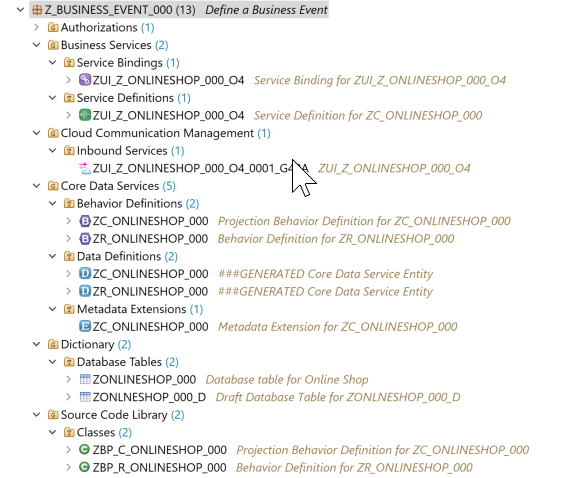
You will now enhance the behavior definition of the BO entity, by adding the business event ItemIsOrdered. This event will be raised to send a message each time a new item is created in an order.
- First create a parameter,
ZA_ItemOrdered_###as a data definition (abstract entity). You can then provide more information in the message, such as the name of the item ordered. To do this, select Core Data Services > Data Definition in your package, choose New > Data Definition from the context menu. Then enter the following.
- Name:
ZA_ItemOrdered_### - Description: Item Ordered Abstract Entity
Copy the code below in this definition. Save and activate.
CDS@EndUserText.label: 'event parameter' define abstract entity ZA_ItemOrdered_### { ItemName : abap.char(25); created_at : abp_creation_tstmpl; }Select the behavior definition
ZR_ONLINESHOP_###Business events must be raised in the save sequence at runtime. Therefore, you need to enable the additional save for our managed BO by adding the statement with additional save. You will also add the keywords with full data to always have access to all the data of the relevant
OnlineShopentity instances without having to read them. Replace the code in the business definition with the code below; replace###with your number or initials.CDSmanaged with additional save with full data implementation in class ZBP_R_ONLINESHOP_### unique; strict ( 2 ); with draft; define behavior for ZR_ONLINESHOP_### alias ZrOnlineshop### persistent table ZONLINESHOP_### draft table ZONLNESHOP_###_D etag master LocalLastChangedAt lock master total etag LastChangedAt authorization master( global ) { field ( readonly ) Creationdate, orderId, deliverydate, LocalCreatedBy, LocalCreatedAt, LocalLastChangedBy, LocalLastChangedAt, LastChangedAt; field ( numbering : managed, readonly ) OrderUuid; field ( mandatory ) OrderedItem; create; update; delete; draft action Activate optimized; draft action Discard; draft action Edit; draft action Resume; draft determine action Prepare; mapping for ZONLINESHOP_### { OrderUuid = order_uuid; OrderId = order_id; Ordereditem = ordereditem; Deliverydate = deliverydate; Creationdate = creationdate; LocalCreatedBy = local_created_by; LocalCreatedAt = local_created_at; LocalLastChangedBy = local_last_changed_by; LocalLastChangedAt = local_last_changed_at; LastChangedAt = last_changed_at; } }Now add a new event with a parameter,
ItemIsOrdered_###to the business object. This event will be raised when a new item is ordered and will pass the values in the parameterZA_ItemOrdered_###.
Add the following code, just after delete; and before draft action Activate optimized:
event ItemIsOrdered parameter ZA_ItemOrdered_###;Save and activate your behavior definition ZR_ONLINE_SHOP_###.
In your behavior definition
ZR_ONLINESHOP_###, set the cursor on the statementwith additional save with full dataand start Quick Fix by choosingCtrl+1.Select Add required method save_modified in new local saver class in the Quick Assist view to update the behavior pool accordingly.
The adjusted local saver class of the behavior implementation class ZBP_R_ONLINESHOP### is now opened in Local Types tab of the editor.
Please check the name of your behavior pool in the BO behavior definition, as it may be different. Don’t forget that all artifacts of your application are generated by the wizard.
Now implement the additional save method to raise the entity event.
ABAPMETHOD save_modified. IF create-zronlineshop### IS NOT INITIAL. RAISE ENTITY EVENT ZR_ONLINESHOP_###~ItemIsOrdered FROM VALUE #( FOR zronlineshop### IN create-zronlineshop### ( %key = zronlineshop###-%key %param-ItemName = zronlineshop###-Ordereditem ) ). ENDIF. ENDMETHOD.Save and activate your class.
Now, you will implement the event handler class ZEH_ITEM_ORDERED_### to enable local consumption of the event ItemIsOrdered_### raised by the BO entity, ZR_ONLINE_SHOP_###.
First, you will create a database table ZITEMORDERD_### with a UUID-based primary key to store the received event information.
- In your package
Z_BUSINESS_EVENT_###, navigate to Dictionary > Database Tables, select it, choose New Database Table from the context menu then enter the following:
- Name:
ZITEMORDERD_###(compare the name of your abstract entityZA_ItemOrdered_###) - Description: Event data for new item ordered
Select a transport request and choose Finish.
Replace the default table definition with the source code provided below and replace all occurrences of the placeholder
###with your suffix.ABAP@EndUserText.label : 'Event handler - New item ordered' @AbapCatalog.enhancement.category : #EXTENSIBLE_ANY @AbapCatalog.tableCategory : #TRANSPARENT @AbapCatalog.deliveryClass : #A @AbapCatalog.dataMaintenance : #RESTRICTED define table ZITEMORDERD_### { key mandt : mandt not null; key uuid : sysuuid_x16 not null; ItemName : abap.char(25); created_at : abp_creation_tstmpl; }Save (Ctrl+S) and activate (Ctrl+F3).
Now you will create and implement the event handler class ZEH_ITEM_ORDERED_### for local consumption of the event ItemIsOrdered_### raised by the BO entity, ZR_ONLINE_SHOP_###.
In Project Explorer select your package
Z_BUSINESS_EVENT_###select Source Code Library > Classes and choose New ABAP Class from the context menu. Enter the following, select the transport request, then choose Finish.- Name:
ZEH_ITEM_ORDERED_###, where###is your suffix - Description: Event handler for a new order item
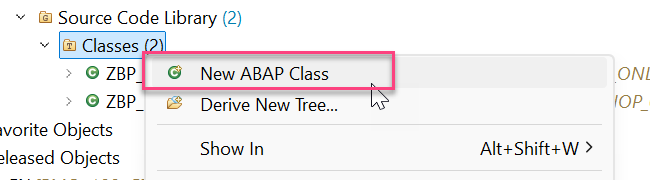
step6a-new-class - Name:
Specify the class as event handler class pool for your RAP BO by adding the statement
FOR EVENTS OF <entity_name>of the class definition section on the Global Class tab, directly after the keyword FINALABAPFOR EVENTS OF ZR_ONLINESHOP_###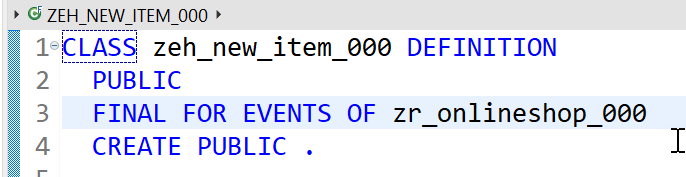
step6b-add-for-events-of Now you will define and implement the local event handler class,
lhe_itemfor the OnlineShop BO. Go to the ❗Local Types tab.For more details on the classes
cl_abap_behavior_event_handlerandcl_abap_txused in the implementation, see the ABAP Keyword documentation ( F1 ).ABAP*"* use this source file for the definition and implementation of *"* local helper classes, interface definitions and type *"* declarations *"* use this source file for the definition and implementation of *"* local helper classes, interface definitions and type *"* declarations CLASS lhe_item DEFINITION INHERITING FROM cl_abap_behavior_event_handler. PRIVATE SECTION. METHODS get_uuid RETURNING VALUE(uuid) TYPE sysuuid_x16. METHODS on_item_is_ordered FOR ENTITY EVENT created FOR zronlineshop###~ItemIsOrdered. ENDCLASS. CLASS lhe_item IMPLEMENTATION. METHOD get_uuid. TRY. uuid = cl_system_uuid=>create_uuid_x16_static( ) . CATCH cx_uuid_error. ENDTRY. ENDMETHOD. METHOD on_item_is_ordered. "close the active modify phase cl_abap_tx=>save( ). " assign values in abstract entity ZA_ITEMORDERED_### to table for event handler " loop over transfered instances and do the needful ;) LOOP AT created REFERENCE INTO DATA(lr_created). DATA lr_item_is_ordered TYPE ZITEMORDERD_###. MOVE-CORRESPONDING lr_created->* TO lr_item_is_ordered. lr_item_is_ordered-uuid = get_uuid( ). lr_item_is_ordered-itemname = lr_created->ItemName. lr_item_is_ordered-created_at = lr_created->created_at. "insert to db INSERT ZITEMORDERD_### FROM @lr_item_is_ordered. ENDLOOP. ENDMETHOD. ENDCLASS.
The local event handler class must inherit from the superclass cl_abap_behavior_event_handler.
Our current local event handler contains a RAP event handler method to handle on_item_is_ordered() for the event item_is_ordered.
In the method signature, the importing parameter, the entity, as well as the event to be consumed are specified.
Note: An event can only be handled by one method within an event handler class. However, method handling across multiple handler classes is possible.
In this exercise, the method get_uuid() is used for convenience to centrally generate UUIDs for the new database records to be persisted.
About the implementation of the RAP event handler method on_item_is_ordered():
Because we are doing an insert on a database, we must first close the active modify phase of the RAP LUW by calling the method
cl_abap_tx=>save() . Loop over the transfered event instances and perform the insert.
Save (Ctrl+S) and activate (Ctrl+F3) the class.
First, start the Data Preview (F8) of the new database table
ZITEM_E_###to store the received event information. No data should appear because no new item has been ordered and therefore the event**ItemIsOrdered**has not been raised yet.Now, open the Fiori Elements preview (from the Service Binding) and create a new order item.

step7a-test-fep Go back to the ABAP Development Tools and refresh the Data Preview of the database table
ZITEM_E_###or start the Data Preview again (F8). You should now see a new entry for the newly created Agency record in the database table.
step7c-data-preview
Resources
Discussion
Share feedback on this tutorial or join the conversation in SAP Community.