
Create Value Help, Enhance the Behavior Definition and Behavior Implementation of the Shopping Cart Business Object
Create your first order in the shopping cart.
Overview
You will learn
- How to enhance a behavior definition
- How to create a value help
- How to enhance a behavior implementation
- How to run the SAP Fiori Elements Preview


Prerequisites
Prerequisites
- This tutorial can be used in both SAP S/4HANA Cloud, private edition system and SAP S/4HANA on-premise system with release 2023 FPS03. We suggest using a [Fully-Activated Appliance] (https://blogs.sap.com/2018/12/12/sap-s4hana-fully-activated-appliance-create-your-sap-s4hana-1809-system-in-a-fraction-of-the-usual-setup-time/) in SAP Cloud Appliance Library for an easy start without the need for system setup.
- For SAP S/4HANA on-premise, create developer user with full development authorization
- You have installed the latest Eclipse with ADT.
- Business role
SAP_BR_PURCHASERneeds to be assigned to your business user - Use Starter Development Tenant in S/4HANA Cloud for the tutorial to have necessary sample data in place.
Steps
In the shopping cart, customers can order various items. Once an item is ordered, a new purchase requisition is created via purchase requisitions API.
Intro
In this tutorial, wherever ### appears, use a number (e.g. 000). This tutorial is done with the placeholder 000.
In this tutorial example a SAP S/4HANA on-premise system with release 2023 FPS03 was used. The mode therefore is strict (2).
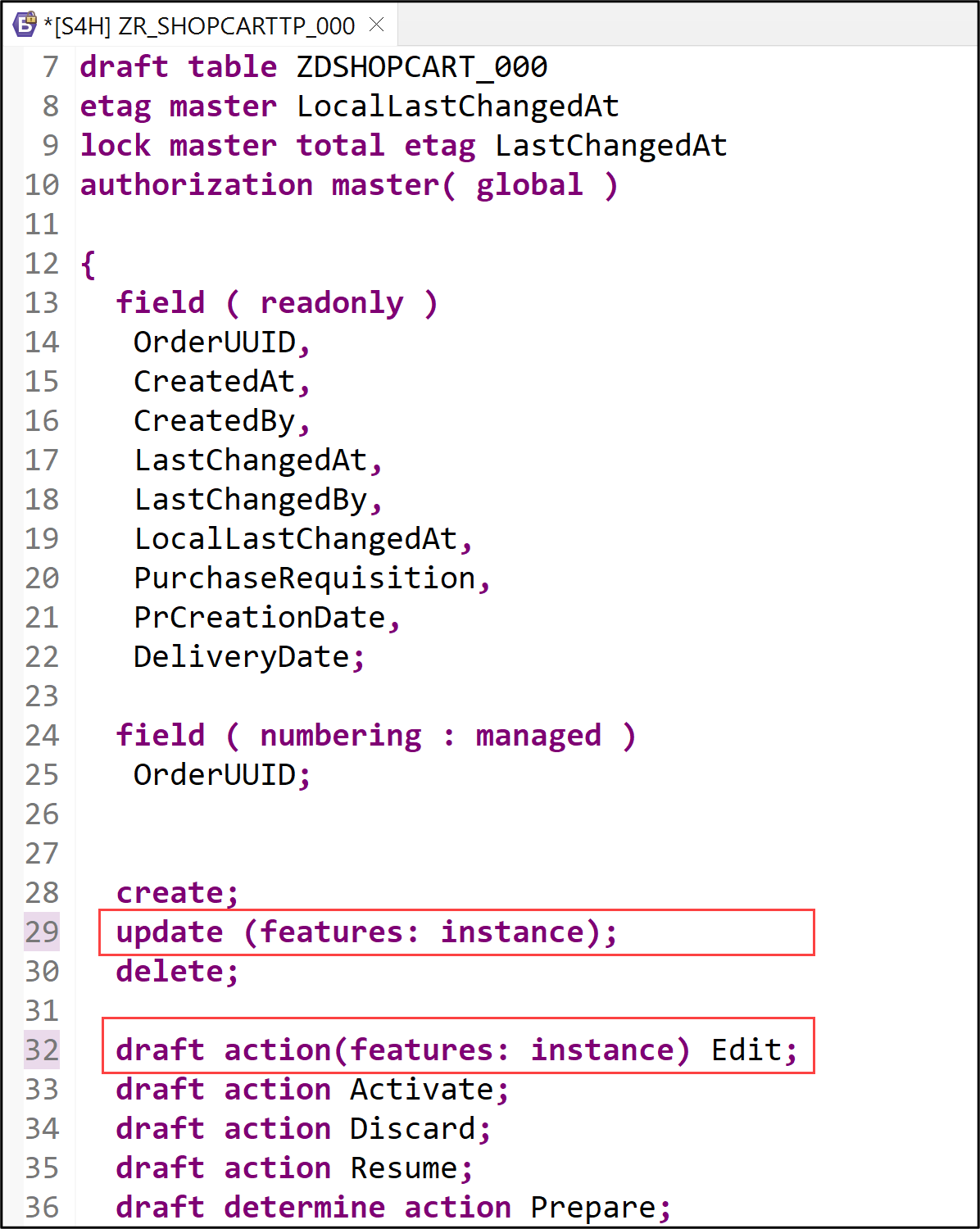
- Open your behavior definition
ZR_SHOPCARTTP_###to enhance it. Add the following statements to your behavior definition:
```ABAP
update (features: instance);
.
.
draft action(features: instance) Edit;
```
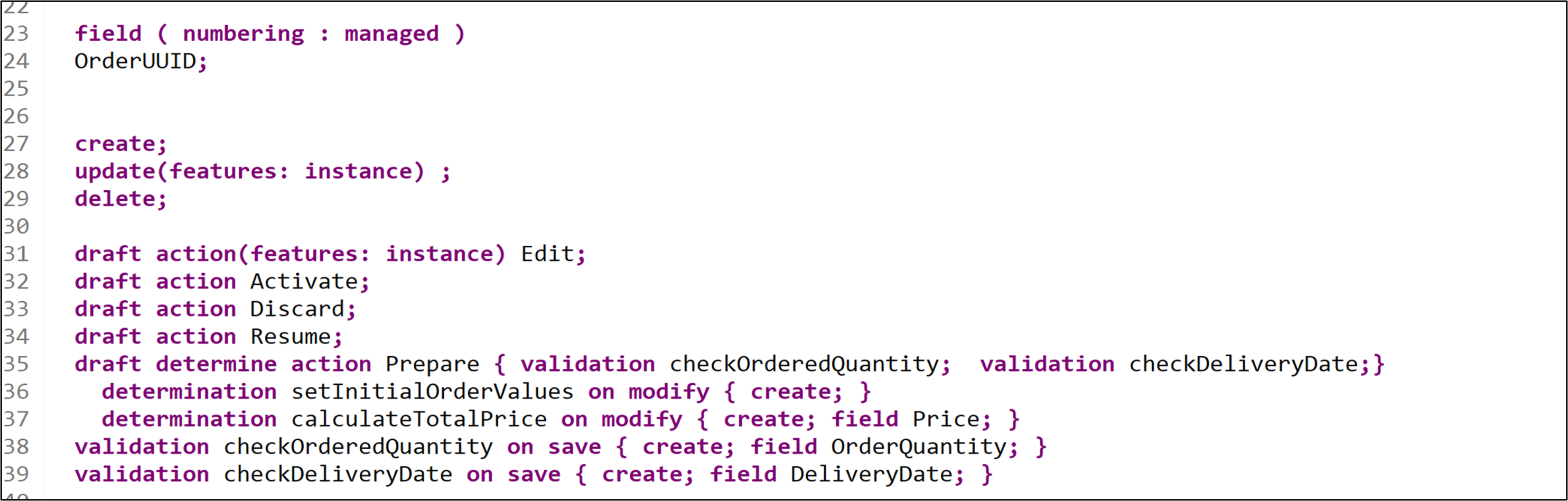
- Replace the following statements to your behavior definition:
```ABAP
draft determine action Prepare { validation checkOrderedQuantity; validation checkDeliveryDate;}
determination setInitialOrderValues on modify { create; }
determination calculateTotalPrice on modify { create; field Price; }
validation checkOrderedQuantity on save { create; field OrderQuantity; }
validation checkDeliveryDate on save { create; field DeliveryDate; }
```
- Check your behavior definition:
```ABAP
managed implementation in class ZBP_SHOPCARTTP_### unique;
strict ( 2 );
with draft;

define behavior for ZR_SHOPCARTTP_### alias ShoppingCart
persistent table zashopcart_###
draft table ZDSHOPCART_###
etag master LocalLastChangedAt
lock master total etag LastChangedAt
authorization master( global )
{
  field ( readonly )
  OrderUUID,
  CreatedAt,
  CreatedBy,
  LastChangedAt,
  LastChangedBy,
  LocalLastChangedAt,
  PurchaseRequisition,
  PrCreationDate,
  DeliveryDate;

  field ( numbering : managed )
  OrderUUID;

  create;
  update(features: instance) ;
  delete;

  draft action(features: instance) Edit;
  draft action Activate;
  draft action Discard;
  draft action Resume;
  draft determine action Prepare { validation checkOrderedQuantity;  validation checkDeliveryDate;}
    determination setInitialOrderValues on modify { create; }
    determination calculateTotalPrice on modify { create; field Price; }
    validation checkOrderedQuantity on save { create; field OrderQuantity; }
    validation checkDeliveryDate on save { create; field DeliveryDate; }

  mapping for ZASHOPCART_###
  {
    OrderUUID = order_uuid;
    OrderID = order_id;
    OrderedItem = ordered_item;
    Price = price;
    TotalPrice = total_price;
    Currency = currency;
    OrderQuantity = order_quantity;
    DeliveryDate = delivery_date;
    OverallStatus = overall_status;
    Notes = notes;
    CreatedBy = created_by;
    CreatedAt = created_at;
    LastChangedBy = last_changed_by;
    LastChangedAt = last_changed_at;
    LocalLastChangedAt = local_last_changed_at;
    PurchaseRequisition = purchase_requisition;
    PrCreationDate = pr_creation_date;
  }
}
```
**Hint:** Please replace **`###`** with your ID.
- Save and activate.
This data definition is needed to create a value help for products.
Right-click Data Definitions and select New Data Definition.

projection Create a new data definition:
Name:
ZI_Products_###Description: data definition for products
Click Next >.

projection
Click Finish.

projection In your data definition
ZI_Products_###replace your code with following:ABAP@AbapCatalog.viewEnhancementCategory: [#NONE] @AccessControl.authorizationCheck: #NOT_REQUIRED @EndUserText.label: 'Value Help for I_PRODUCT' @Metadata.ignorePropagatedAnnotations: true @ObjectModel.usageType:{ serviceQuality: #X, sizeCategory: #S, dataClass: #MIXED } define view entity ZI_PRODUCTS_### as select from I_Product { key Product as Product, _Text[1: Language=$session.system_language].ProductName as ProductText, @Semantics.amount.currencyCode: 'Currency' case when Product = 'D001' then cast ( 1000.00 as abap.dec(16,2) ) when Product = 'D002' then cast ( 499.00 as abap.dec(16,2) ) when Product = 'D003' then cast ( 799.00 as abap.dec(16,2) ) when Product = 'D004' then cast ( 249.00 as abap.dec(16,2) ) when Product = 'D005' then cast ( 1500.00 as abap.dec(16,2) ) when Product = 'D006' then cast ( 30.00 as abap.dec(16,2) ) else cast ( 100000.00 as abap.dec(16,2) ) end as Price, @UI.hidden: true cast ( 'EUR' as abap.cuky( 5 ) ) as Currency, @UI.hidden: true ProductGroup as ProductGroup, @UI.hidden: true BaseUnit as BaseUnit } where Product = 'D001' or Product = 'D002' or Product = 'D003' or Product = 'D004' or Product = 'D005' or Product = 'D006'Save and activate.
In the Project Explorer navigate to the CDS projection view ZC_SHOPCARTTP_###*.
Here add the following code above the fields OrderedItem and Currency:
  @Consumption.valueHelpDefinition: [{ entity:
             {name: 'ZI_PRODUCTS_###' , element: 'Product' },
             additionalBinding: [{ localElement: 'Price', element: 'Price', usage: #RESULT },
                                 { localElement: 'Currency', element: 'Currency', usage: #RESULT }
                                                                   ]
             }]
  OrderedItem,
and
  @Consumption.valueHelpDefinition: [ { entity: { name: 'I_Currency', element: 'Currency' } } ]
  Currency,
Save and activate.
Hint: Please replace ### with your ID.
- Open the behavior implementation
ZBP_SHOPCARTTP_###, add the constantc_overall_statusto your behavior implementation. In your Local Types, replace your code with following:
CLASS lhc_shopcart DEFINITION INHERITING FROM cl_abap_behavior_handler.
PRIVATE SECTION.
  CONSTANTS:
    BEGIN OF c_overall_status,
      new       TYPE string VALUE 'New / Composing',

      submitted TYPE string VALUE 'Submitted / Approved',
      cancelled TYPE string VALUE 'Cancelled',
    END OF c_overall_status.
  METHODS:
    get_global_authorizations FOR GLOBAL AUTHORIZATION
      IMPORTING
      REQUEST requested_authorizations FOR ShoppingCart
      RESULT result,
    get_instance_features FOR INSTANCE FEATURES
      IMPORTING keys REQUEST requested_features FOR ShoppingCart RESULT result.

  METHODS calculateTotalPrice FOR DETERMINE ON MODIFY
    IMPORTING keys FOR ShoppingCart~calculateTotalPrice.

  METHODS setInitialOrderValues FOR DETERMINE ON MODIFY
    IMPORTING keys FOR ShoppingCart~setInitialOrderValues.

  METHODS checkDeliveryDate FOR VALIDATE ON SAVE
    IMPORTING keys FOR ShoppingCart~checkDeliveryDate.

  METHODS checkOrderedQuantity FOR VALIDATE ON SAVE
    IMPORTING keys FOR ShoppingCart~checkOrderedQuantity.
ENDCLASS.

CLASS lhc_shopcart IMPLEMENTATION.
METHOD get_global_authorizations.
ENDMETHOD.
METHOD get_instance_features.

  " read relevant olineShop instance data
  READ ENTITIES OF zr_shopcarttp_### IN LOCAL MODE
    ENTITY ShoppingCart
      FIELDS ( OverallStatus )
      WITH CORRESPONDING #( keys )
    RESULT DATA(OnlineOrders)
    FAILED failed.

  " evaluate condition, set operation state, and set result parameter
  " update and checkout shall not be allowed as soon as purchase requisition has been created
  result = VALUE #( FOR OnlineOrder IN OnlineOrders
                    ( %tky                   = OnlineOrder-%tky
                      %features-%update
                        = COND #( WHEN OnlineOrder-OverallStatus = c_overall_status-submitted  THEN if_abap_behv=>fc-o-disabled
                                  WHEN OnlineOrder-OverallStatus = c_overall_status-cancelled THEN if_abap_behv=>fc-o-disabled
                                  ELSE if_abap_behv=>fc-o-enabled   )
                      %action-Edit
                        = COND #( WHEN OnlineOrder-OverallStatus = c_overall_status-submitted THEN if_abap_behv=>fc-o-disabled
                                  WHEN OnlineOrder-OverallStatus = c_overall_status-cancelled THEN if_abap_behv=>fc-o-disabled
                                  ELSE if_abap_behv=>fc-o-enabled   )
                      ) ).
ENDMETHOD.

METHOD calculateTotalPrice.
  DATA total_price TYPE zr_shopcarttp_###-TotalPrice.

  " read transfered instances
  READ ENTITIES OF zr_shopcarttp_### IN LOCAL MODE
    ENTITY ShoppingCart
      FIELDS ( OrderID TotalPrice )
      WITH CORRESPONDING #( keys )
    RESULT DATA(OnlineOrders).

  LOOP AT OnlineOrders ASSIGNING FIELD-SYMBOL(<OnlineOrder>).
    " calculate total value
    <OnlineOrder>-TotalPrice = <OnlineOrder>-Price * <OnlineOrder>-OrderQuantity.
  ENDLOOP.

  "update instances
  MODIFY ENTITIES OF zr_shopcarttp_### IN LOCAL MODE
    ENTITY ShoppingCart
      UPDATE FIELDS ( TotalPrice )
      WITH VALUE #( FOR OnlineOrder IN OnlineOrders (
                        %tky       = OnlineOrder-%tky
                        TotalPrice = <OnlineOrder>-TotalPrice
                      ) ).
ENDMETHOD.

METHOD setInitialOrderValues.

  DATA delivery_date TYPE I_PurchaseReqnItemTP-DeliveryDate.
  DATA(creation_date) = cl_abap_context_info=>get_system_date(  ).
  "set delivery date proposal
  delivery_date = cl_abap_context_info=>get_system_date(  ) + 14.
  "read transfered instances
  READ ENTITIES OF ZR_shopcarttp_### IN LOCAL MODE
    ENTITY ShoppingCart
      FIELDS ( OrderID OverallStatus  DeliveryDate )
      WITH CORRESPONDING #( keys )
    RESULT DATA(OnlineOrders).

  "delete entries with assigned order ID
  DELETE OnlineOrders WHERE OrderID IS NOT INITIAL.
  CHECK OnlineOrders IS NOT INITIAL.

  " **Dummy logic to determine order IDs**
  " get max order ID from the relevant active and draft table entries
  SELECT MAX( order_id ) FROM zashopcart_### INTO @DATA(max_order_id). "active table
  SELECT SINGLE FROM zdshopcart_### FIELDS MAX( orderid ) INTO @DATA(max_orderid_draft). "draft table
  IF max_orderid_draft > max_order_id.
    max_order_id = max_orderid_draft.
  ENDIF.

  "set initial values of new instances
  MODIFY ENTITIES OF zr_shopcarttp_### IN LOCAL MODE
    ENTITY ShoppingCart
      UPDATE FIELDS ( OrderID OverallStatus  DeliveryDate Price  )
      WITH VALUE #( FOR order IN OnlineOrders INDEX INTO i (
                        %tky          = order-%tky
                        OrderID       = max_order_id + i
                        OverallStatus = c_overall_status-new  "'New / Composing'
                        DeliveryDate  = delivery_date
                        CreatedAt     = creation_date
                      ) ).
ENDMETHOD.

METHOD checkDeliveryDate.

*   " read transfered instances
  READ ENTITIES OF zr_shopcarttp_### IN LOCAL MODE
    ENTITY ShoppingCart
      FIELDS ( DeliveryDate )
      WITH CORRESPONDING #( keys )
    RESULT DATA(OnlineOrders).

  DATA(creation_date) = cl_abap_context_info=>get_system_date(  ).


  "raise msg if delivery date is not ok
  LOOP AT OnlineOrders INTO DATA(online_order).
    APPEND VALUE #(  %tky           = Online_Order-%tky
                     %state_area    = 'VALIDATE_DELIVERYDATE'
                  ) TO reported-ShoppingCart.

    IF online_order-DeliveryDate IS INITIAL OR online_order-DeliveryDate = ' '.
      APPEND VALUE #( %tky = online_order-%tky ) TO failed-ShoppingCart.
      APPEND VALUE #( %tky         = online_order-%tky
                      %state_area   = 'VALIDATE_DELIVERYDATE'
                      %msg          = new_message_with_text(
                              severity = if_abap_behv_message=>severity-error
                              text     = 'Delivery Date cannot be initial' )
                      %element-deliverydate  = if_abap_behv=>mk-on
                    ) TO reported-ShoppingCart.

    ELSEIF  ( ( online_order-DeliveryDate ) - creation_date ) < 14.
      APPEND VALUE #(  %tky = online_order-%tky ) TO failed-ShoppingCart.
      APPEND VALUE #(  %tky          = online_order-%tky
                      %state_area   = 'VALIDATE_DELIVERYDATE'
                      %msg          = new_message_with_text(
                              severity = if_abap_behv_message=>severity-error
                              text     = 'Delivery Date should be at least 14 days after the creation date'  )
                      %element-deliverydate  = if_abap_behv=>mk-on
                    ) TO reported-ShoppingCart.
    ENDIF.
  ENDLOOP.
ENDMETHOD.

METHOD checkOrderedQuantity.

  "read relevant order instance data
  READ ENTITIES OF zr_shopcarttp_### IN LOCAL MODE
  ENTITY ShoppingCart
  FIELDS ( OrderID OrderedItem OrderQuantity )
  WITH CORRESPONDING #( keys )
  RESULT DATA(OnlineOrders).

  "raise msg if 0 > qty <= 10
  LOOP AT OnlineOrders INTO DATA(OnlineOrder).
    APPEND VALUE #(  %tky           = OnlineOrder-%tky
                    %state_area    = 'VALIDATE_QUANTITY'
                  ) TO reported-ShoppingCart.


    IF OnlineOrder-OrderQuantity IS INITIAL OR OnlineOrder-OrderQuantity = ' '.
      APPEND VALUE #( %tky = OnlineOrder-%tky ) TO failed-ShoppingCart.
      APPEND VALUE #( %tky          = OnlineOrder-%tky
                      %state_area   = 'VALIDATE_QUANTITY'
                      %msg          = new_message_with_text(
                              severity = if_abap_behv_message=>severity-error
                              text     = 'Quantity cannot be empty' )
                      %element-orderquantity = if_abap_behv=>mk-on
                    ) TO reported-ShoppingCart.

    ELSEIF OnlineOrder-OrderQuantity > 10.
      APPEND VALUE #(  %tky = OnlineOrder-%tky ) TO failed-ShoppingCart.
      APPEND VALUE #(  %tky          = OnlineOrder-%tky
                      %state_area   = 'VALIDATE_QUANTITY'
                      %msg          = new_message_with_text(
                              severity = if_abap_behv_message=>severity-error
                              text     = 'Quantity should be below 10' )
                      %element-orderquantity  = if_abap_behv=>mk-on
                    ) TO reported-ShoppingCart.
      ENDIF.
    ENDLOOP.
    ENDMETHOD.
ENDCLASS.Save and activate.
Go back to your behavior definition ZR_SHOPCARTTP_### and activate it again, if needed.
Select
ShoppingCartin your service binding and click Preview to open SAP Fiori Elements preview.
preview Click Create to create a new entry.

preview Make use of the value help for ordered item and select one. Add also the ordered quantity and click Create.

preview Your order is now created and the total price is calculated automatically.

preview
Resources
Discussion
Share feedback on this tutorial or join the conversation in SAP Community.