This tutorial can be used in both SAP S/4HANA Cloud, private edition system and SAP S/4HANA on-premise system with release 2022 FPS01. We suggest using a Fully-Activated Appliance in SAP Cloud Appliance Library for an easy start without the need for system setup.
For SAP S/4HANA on-premise, create developer user with full development authorization
In the shopping cart, customers can order various items. Once an item is ordered, a new purchase requisition is created via purchase requisitions API.
EML can be used to trigger purchase requisitions API, which is released for cloud development.
Intro
In this tutorial, wherever ### appears, use a number (e.g. 000).
Step 1Enhance behavior definition of data model
—
Hint: In case of S/4HANA 2022 FPS01, strict(1) mode must be used.
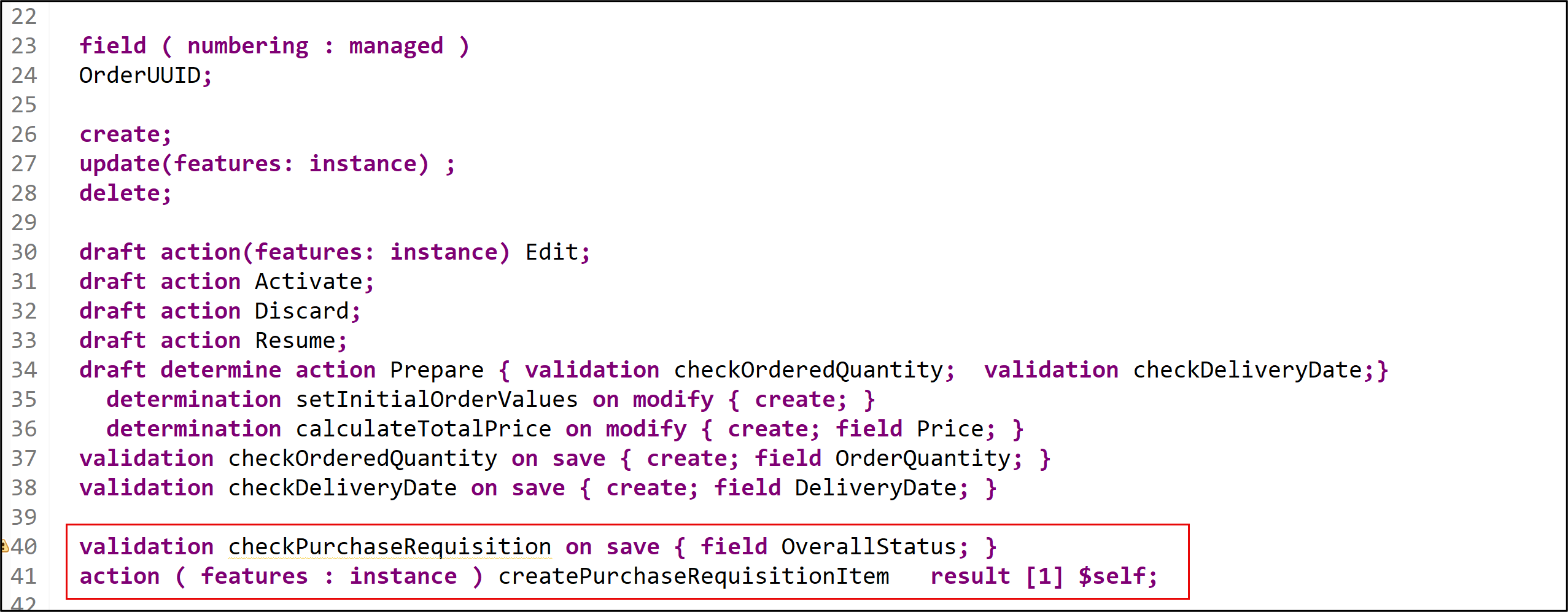
Add the following action statement for createPurchaseRequisitionItem to your behavior definition ZR_SHOPCARTTP_###.
```ABAP
validation checkPurchaseRequisition on save { field OverallStatus; }
action ( features : instance ) createPurchaseRequisitionItem result [1] $self;
```
**Hint:** Please replace **`###`** with your ID.
Check your behavior definition:
```ABAP
managed implementation in class ZBP_SHOPCARTTP_### unique;
strict ( 2 );
with draft;

define behavior for ZR_SHOPCARTTP_### alias ShoppingCart
persistent table zashopcart_###
draft table ZDSHOPCART_###
etag master LocalLastChangedAt
lock master total etag LastChangedAt
authorization master( global )

{
  field ( readonly )
  OrderUUID,
  CreatedAt,
  CreatedBy,
  LastChangedAt,
  LastChangedBy,
  LocalLastChangedAt,
  PurchaseRequisition,
  PrCreationDate,
  DeliveryDate;

  field ( numbering : managed )
  OrderUUID;

  create;
  update(features: instance) ;
  delete;

  draft action(features: instance) Edit;
  draft action Activate;
  draft action Discard;
  draft action Resume;
  draft determine action Prepare { validation checkOrderedQuantity;  validation checkDeliveryDate;}
    determination setInitialOrderValues on modify { create; }
    determination calculateTotalPrice on modify { create; field Price; }
  validation checkOrderedQuantity on save { create; field OrderQuantity; }
  validation checkDeliveryDate on save { create; field DeliveryDate; }

  validation checkPurchaseRequisition on save { field OverallStatus; }
  action ( features : instance ) createPurchaseRequisitionItem result [1] $self;

  mapping for ZASHOPCART_###
  {
    OrderUUID = order_uuid;
    OrderID = order_id;
    OrderedItem = ordered_item;
    Price = price;
    TotalPrice = total_price;
    Currency = currency;
    OrderQuantity = order_quantity;
    DeliveryDate = delivery_date;
    OverallStatus = overall_status;
    Notes = notes;
    CreatedBy = created_by;
    CreatedAt = created_at;
    LastChangedBy = last_changed_by;
    LastChangedAt = last_changed_at;
    LocalLastChangedAt = local_last_changed_at;
    PurchaseRequisition = purchase_requisition;
    PrCreationDate = pr_creation_date;
  }
}
```
Save and activate.
Step 2Enhance behavior definition of projection view
+
Open your behavior definition ZC_SHOPCARTTP_### to enhance it. Add action createPurchaseRequisitionItem to your behavior definition.
ABAP
useactioncreatePurchaseRequisitionItem;
projection
Check your behavior definition:
```ABAP
projection;
strict ( 2 );
use draft;

define behavior for ZC_SHOPCARTTP_### alias ShoppingCart
use etag
{
  use create;
  use update;
  use delete;

  use action Edit;
  use action Activate;
  use action Discard;
  use action Resume;
  use action Prepare;
  use action createPurchaseRequisitionItem;
}
```
Save and activate.
Step 3Enhance metadata extension
+
Open your metadata extension ZC_SHOPCARTTP_### to enhance it. Add following annotation to PurchaseRequisition.
In our scenario, we want to integrate the released purchase requisition API during the save sequence.
Open the behavior definition ZR_SHOPCARTTP_###, delete the following line:
```ABAP
persistent table zashopcart_###
```
In your behavior definition ZR_SHOPCARTTP_### add the with unmanaged save statement.
```ABAP
with unmanaged save
```
So that it looks as follows:

```ABAP
managed implementation in class ZBP_SHOPCARTTP_### unique;
strict ( 2 );
with draft;

define behavior for ZR_SHOPCARTTP_### alias ShoppingCart
draft table ZDSHOPCART_###
etag master LocalLastChangedAt
lock master total etag LastChangedAt
authorization master( global )
with unmanaged save
{
  field ( readonly )
  OrderUUID,
  CreatedAt,
  CreatedBy,
  LastChangedAt,
  LastChangedBy,
  LocalLastChangedAt,
  PurchaseRequisition,
  PrCreationDate,
  DeliveryDate;

  field ( numbering : managed )
  OrderUUID;

  create;
  update(features: instance) ;
  delete;

  draft action(features: instance) Edit;
  draft action Activate;
  draft action Discard;
  draft action Resume;
  draft determine action Prepare { validation checkOrderedQuantity;  validation checkDeliveryDate;}
    determination setInitialOrderValues on modify { create; }
    determination calculateTotalPrice on modify { create; field Price; }
  validation checkOrderedQuantity on save { create; field OrderQuantity; }
  validation checkDeliveryDate on save { create; field DeliveryDate; }

  validation checkPurchaseRequisition on save { field OverallStatus; }
  action ( features : instance ) createPurchaseRequisitionItem result [1] $self;

  mapping for ZASHOPCART_###
  {
    OrderUUID = order_uuid;
    OrderID = order_id;
    OrderedItem = ordered_item;
    Price = price;
    TotalPrice = total_price;
    Currency = currency;
    OrderQuantity = order_quantity;
    DeliveryDate = delivery_date;
    OverallStatus = overall_status;
    Notes = notes;
    CreatedBy = created_by;
    CreatedAt = created_at;
    LastChangedBy = last_changed_by;
    LastChangedAt = last_changed_at;
    LocalLastChangedAt = local_last_changed_at;
    PurchaseRequisition = purchase_requisition;
    PrCreationDate = pr_creation_date;
  }
}
```
Save and activate it. Position the cursor on the with unmanaged save statement and use the shortcut ctrl + 1 to load the quick assist proposals, then double-click on Add required method save_modified in new local saver class to automatically create an empty implementation for the method. Implement it as follows:
```ABAP
METHOD save_modified.
  DATA : lt_shopping_cart_as        TYPE STANDARD TABLE OF zashopcart_###.
  IF create-shoppingcart IS NOT INITIAL.
    lt_shopping_cart_as = CORRESPONDING #( create-shoppingcart MAPPING FROM ENTITY ).
    INSERT zashopcart_### FROM TABLE @lt_shopping_cart_as.
  ENDIF.
  IF update IS NOT INITIAL.
    CLEAR lt_shopping_cart_as.
    lt_shopping_cart_as = CORRESPONDING #( update-shoppingcart MAPPING FROM ENTITY ).
    LOOP AT update-shoppingcart  INTO DATA(shoppingcart) WHERE OrderUUID IS NOT INITIAL.
      MODIFY zashopcart_### FROM TABLE @lt_shopping_cart_as.
    ENDLOOP.
  ENDIF.

  IF update IS NOT INITIAL.
    DATA(creation_date) = cl_abap_context_info=>get_system_date(  ).

    LOOP AT update-shoppingcart INTO DATA(OnlineOrder1) WHERE %control-OverallStatus = if_abap_behv=>mk-on .
      LOOP AT zbp_shopcarttp_###=>purchase_requisition_details INTO DATA(purchase_reqn_via_eml) WHERE  pid IS NOT INITIAL AND order_uuid = onlineorder1-OrderUUID.
        CONVERT KEY OF i_purchaserequisitiontp FROM purchase_reqn_via_eml-pid TO DATA(ls_pr_key1).
        UPDATE zashopcart_### SET purchase_requisition = @ls_pr_key1-PurchaseRequisition,
                                      pr_creation_date = @creation_date
                                      WHERE order_uuid = @purchase_reqn_via_eml-Order_UUID.
      ENDLOOP.
    ENDLOOP.
  ENDIF.

  LOOP AT delete-shoppingcart INTO DATA(shoppingcart_delete) WHERE OrderUUID IS NOT INITIAL.
    DELETE FROM zashopcart_### WHERE order_uuid = @shoppingcart_delete-OrderUUID.
    DELETE FROM zdshopcart_### WHERE orderuuid = @shoppingcart_delete-OrderUUID.
  ENDLOOP.
ENDMETHOD.
```
Save, don’t activate it yet!
We use the unmanaged save option for our scenario, rather than the additional save option. This is because the additional save should only be used in case data needs to be saved in addition to BO data in a persistence outside the BO, as stated in the Additional Save documentation. Since this is not our use case (the purchase requisition is created and saved in the persistency of the shopping cart BO), we rely on the unmanaged save option.
Step 5Enhance behavior implementation
+
Hint: Please replace ### with your ID.
For S/4HANA on premise: Material D001 or similar needs to be created in system if S/4HANA on-premise is used. More information
In your Global Class, replace your code with following:
```ABAP
class ZBP_SHOPCARTTP_### definition
  public
  abstract
  final
  for behavior of ZR_SHOPCARTTP_### .
public section.
TYPES: BEGIN OF ty_pr_details,
            pid        TYPE abp_behv_pid,
            cid        TYPE abp_behv_cid,
            pur_req    TYPE zashopcart_###-purchase_requisition,
            order_uuid TYPE zashopcart_###-order_uuid,
          END OF ty_pr_details.
    CLASS-DATA purchase_requisition_details TYPE TABLE OF ty_pr_details.
protected section.
private section.
ENDCLASS.

***

CLASS ZBP_SHOPCARTTP_### IMPLEMENTATION.
ENDCLASS.
```
Add the missing constant to your implementation, the createPurchaseRequisitionItem action and enhance the save_modified method. In your Local Types, replace your code with following:
```ABAP
CLASS lsc_zr_shopcarttp_### DEFINITION INHERITING FROM cl_abap_behavior_saver.

  PROTECTED SECTION.

    METHODS save_modified REDEFINITION.

ENDCLASS.

CLASS lsc_zr_shopcarttp_### IMPLEMENTATION.

  METHOD save_modified.
    DATA : lt_shopping_cart_as        TYPE STANDARD TABLE OF zashopcart_###.
    IF create-shoppingcart IS NOT INITIAL.
      lt_shopping_cart_as = CORRESPONDING #( create-shoppingcart MAPPING FROM ENTITY ).
      INSERT zashopcart_### FROM TABLE @lt_shopping_cart_as.
    ENDIF.
    IF update IS NOT INITIAL.
      CLEAR lt_shopping_cart_as.
      lt_shopping_cart_as = CORRESPONDING #( update-shoppingcart MAPPING FROM ENTITY ).
      LOOP AT update-shoppingcart  INTO DATA(shoppingcart) WHERE OrderUUID IS NOT INITIAL.
        MODIFY zashopcart_### FROM TABLE @lt_shopping_cart_as.
      ENDLOOP.
    ENDIF.

*************Add CONVERT KEY statement for Purchase Requisition create in case of EML implementation type**********

  IF update IS NOT INITIAL.
      DATA(creation_date) = cl_abap_context_info=>get_system_date(  ).

      LOOP AT update-shoppingcart INTO DATA(OnlineOrder1) WHERE %control-OverallStatus = if_abap_behv=>mk-on .
        LOOP AT zbp_shopcarttp_###=>purchase_requisition_details INTO DATA(purchase_reqn_via_eml) WHERE  pid IS NOT INITIAL AND order_uuid = onlineorder1-OrderUUID.
          CONVERT KEY OF i_purchaserequisitiontp FROM purchase_reqn_via_eml-pid TO DATA(ls_pr_key1).
          UPDATE zashopcart_### SET purchase_requisition = @ls_pr_key1-PurchaseRequisition,
                                        pr_creation_date = @creation_date
                                        WHERE order_uuid = @purchase_reqn_via_eml-Order_UUID.
        ENDLOOP.
      ENDLOOP.
    ENDIF.
************END of CONVER KEY EML code snippet******************

    LOOP AT delete-shoppingcart INTO DATA(shoppingcart_delete) WHERE OrderUUID IS NOT INITIAL.
      DELETE FROM zashopcart_### WHERE order_uuid = @shoppingcart_delete-OrderUUID.
      DELETE FROM zdshopcart_### WHERE orderuuid = @shoppingcart_delete-OrderUUID.
    ENDLOOP.
  ENDMETHOD.

ENDCLASS.

CLASS lhc_shopcart DEFINITION INHERITING FROM cl_abap_behavior_handler.
  PRIVATE SECTION.
    CONSTANTS:
      BEGIN OF c_overall_status,
        new       TYPE string VALUE 'New / Composing',
        submitted TYPE string VALUE 'Submitted / Approved',
        cancelled TYPE string VALUE 'Cancelled',
      END OF c_overall_status.
    METHODS:
      get_global_authorizations FOR GLOBAL AUTHORIZATION
        IMPORTING
        REQUEST requested_authorizations FOR ShoppingCart
        RESULT result,
      get_instance_features FOR INSTANCE FEATURES
        IMPORTING keys REQUEST requested_features FOR ShoppingCart RESULT result.

    METHODS calculateTotalPrice FOR DETERMINE ON MODIFY
      IMPORTING keys FOR ShoppingCart~calculateTotalPrice.

    METHODS setInitialOrderValues FOR DETERMINE ON MODIFY
      IMPORTING keys FOR ShoppingCart~setInitialOrderValues.

    METHODS checkDeliveryDate FOR VALIDATE ON SAVE
      IMPORTING keys FOR ShoppingCart~checkDeliveryDate.

    METHODS checkOrderedQuantity FOR VALIDATE ON SAVE
      IMPORTING keys FOR ShoppingCart~checkOrderedQuantity.

    METHODS createPurchaseRequisitionItem FOR MODIFY
      IMPORTING keys FOR ACTION ShoppingCart~createPurchaseRequisitionItem RESULT result.

    METHODS checkPurchaseRequisition FOR VALIDATE ON SAVE
      IMPORTING keys FOR ShoppingCart~checkPurchaseRequisition.

ENDCLASS.

CLASS lhc_shopcart IMPLEMENTATION.

  METHOD get_global_authorizations.
  ENDMETHOD.

  METHOD get_instance_features.
    " read relevant olineShop instance data
    READ ENTITIES OF zr_shopcarttp_### IN LOCAL MODE
      ENTITY ShoppingCart
        FIELDS ( OverallStatus )
        WITH CORRESPONDING #( keys )
      RESULT DATA(OnlineOrders)
      FAILED failed.

    " evaluate condition, set operation state, and set result parameter
    " update and checkout shall not be allowed as soon as purchase requisition has been created
    result = VALUE #( FOR OnlineOrder IN OnlineOrders
                      ( %tky                   = OnlineOrder-%tky
                        %features-%update
                          = COND #( WHEN OnlineOrder-OverallStatus = c_overall_status-submitted  THEN if_abap_behv=>fc-o-disabled
                                    WHEN OnlineOrder-OverallStatus = c_overall_status-cancelled THEN if_abap_behv=>fc-o-disabled
                                    ELSE if_abap_behv=>fc-o-enabled   )
                        %action-Edit
                          = COND #( WHEN OnlineOrder-OverallStatus = c_overall_status-submitted THEN if_abap_behv=>fc-o-disabled
                                    WHEN OnlineOrder-OverallStatus = c_overall_status-cancelled THEN if_abap_behv=>fc-o-disabled
                                    ELSE if_abap_behv=>fc-o-enabled   )
                        %action-createPurchaseRequisitionItem
                          = COND #( WHEN OnlineOrder-OverallStatus = c_overall_status-submitted OR OnlineOrder-%is_draft = if_abap_behv=>mk-on
                                    THEN if_abap_behv=>fc-o-disabled
                                    ELSE if_abap_behv=>fc-o-enabled )
                        ) ).
  ENDMETHOD.

  METHOD calculateTotalPrice.
    " read transfered instances
    READ ENTITIES OF zr_shopcarttp_### IN LOCAL MODE
      ENTITY ShoppingCart
        FIELDS ( OrderID TotalPrice Price OrderQuantity )
        WITH CORRESPONDING #( keys )
      RESULT DATA(OnlineOrders).

    LOOP AT OnlineOrders ASSIGNING FIELD-SYMBOL(<OnlineOrder>).
      " calculate total value
      <OnlineOrder>-TotalPrice = <OnlineOrder>-Price * <OnlineOrder>-OrderQuantity.
    ENDLOOP.

    "update instances
    MODIFY ENTITIES OF zr_shopcarttp_### IN LOCAL MODE
      ENTITY ShoppingCart
        UPDATE FIELDS ( TotalPrice )
        WITH VALUE #( FOR OnlineOrder IN OnlineOrders (
                          %tky       = OnlineOrder-%tky
                          TotalPrice = <OnlineOrder>-TotalPrice
                        ) ).
  ENDMETHOD.

  METHOD setInitialOrderValues.
    DATA delivery_date TYPE I_PurchaseReqnItemTP-DeliveryDate.
    DATA(creation_date) = cl_abap_context_info=>get_system_date(  ).
    "set delivery date proposal
    delivery_date = cl_abap_context_info=>get_system_date(  ) + 14.
    "read transfered instances
    READ ENTITIES OF ZR_shopcarttp_### IN LOCAL MODE
      ENTITY ShoppingCart
        FIELDS ( OrderID OverallStatus  DeliveryDate OrderQuantity  )
        WITH CORRESPONDING #( keys )
      RESULT DATA(OnlineOrders).

    "delete entries with assigned order ID
    DELETE OnlineOrders WHERE OrderID IS NOT INITIAL.
    CHECK OnlineOrders IS NOT INITIAL.

    " **Dummy logic to determine order IDs**
    " get max order ID from the relevant active and draft table entries
    SELECT MAX( order_id ) FROM zashopcart_### INTO @DATA(max_order_id). "active table
    SELECT SINGLE FROM zdshopcart_### FIELDS MAX( orderid ) INTO @DATA(max_orderid_draft). "draft table
    IF max_orderid_draft > max_order_id.
      max_order_id = max_orderid_draft.
    ENDIF.

    "set initial values of new instances
    MODIFY ENTITIES OF zr_shopcarttp_### IN LOCAL MODE
      ENTITY ShoppingCart
        UPDATE FIELDS ( OrderID OverallStatus  DeliveryDate   )
        WITH VALUE #( FOR order IN OnlineOrders INDEX INTO i (
                          %tky          = order-%tky
                          OrderID       = max_order_id + i
                          OverallStatus = c_overall_status-new  "'New / Composing'
*                          Price         = COND #( WHEN order-OrderedItem = 'desktop' then 1500
*                                                  when order-OrderedItem = 'laptop' then  2### )

                          DeliveryDate  = delivery_date
                          CreatedAt     = creation_date
                        ) ).
  ENDMETHOD.

  METHOD checkDeliveryDate.
*   " read transfered instances
    READ ENTITIES OF zr_shopcarttp_### IN LOCAL MODE
      ENTITY ShoppingCart
        FIELDS ( DeliveryDate )
        WITH CORRESPONDING #( keys )
      RESULT DATA(OnlineOrders).

    DATA(creation_date) = cl_abap_context_info=>get_system_date(  ).
    "raise msg if 0 > qty <= 10
    LOOP AT OnlineOrders INTO DATA(online_order).
      IF online_order-DeliveryDate IS INITIAL OR online_order-DeliveryDate = ' '.
        APPEND VALUE #( %tky = online_order-%tky ) TO failed-ShoppingCart.
        APPEND VALUE #( %tky         = online_order-%tky
                        %state_area   = 'VALIDATE_DELIVERYDATE'
                        %msg          = new_message_with_text(
                                severity = if_abap_behv_message=>severity-error
                                text     = 'Delivery Date cannot be initial' )
                      ) TO reported-ShoppingCart.

      ELSEIF  ( ( online_order-DeliveryDate ) - creation_date ) < 14.
        APPEND VALUE #(  %tky = online_order-%tky ) TO failed-ShoppingCart.
        APPEND VALUE #(  %tky          = online_order-%tky
                        %state_area   = 'VALIDATE_DELIVERYDATE'
                        %msg          = new_message_with_text(
                                severity = if_abap_behv_message=>severity-error
                                text     = 'Delivery Date should be atleast 14 days after the creation date'  )

                        %element-orderquantity  = if_abap_behv=>mk-on
                      ) TO reported-ShoppingCart.
      ENDIF.
    ENDLOOP.
  ENDMETHOD.

  METHOD checkOrderedQuantity.
    "read relevant order instance data
    READ ENTITIES OF zr_shopcarttp_### IN LOCAL MODE
    ENTITY ShoppingCart
    FIELDS ( OrderID OrderedItem OrderQuantity )
    WITH CORRESPONDING #( keys )
    RESULT DATA(OnlineOrders).

    "raise msg if 0 > qty <= 10
    LOOP AT OnlineOrders INTO DATA(OnlineOrder).
      APPEND VALUE #(  %tky           = OnlineOrder-%tky
                      %state_area    = 'VALIDATE_QUANTITY'
                    ) TO reported-ShoppingCart.

      IF OnlineOrder-OrderQuantity IS INITIAL OR OnlineOrder-OrderQuantity = ' '.
        APPEND VALUE #( %tky = OnlineOrder-%tky ) TO failed-ShoppingCart.
        APPEND VALUE #( %tky          = OnlineOrder-%tky
                        %state_area   = 'VALIDATE_QUANTITY'
                        %msg          = new_message_with_text(
                                severity = if_abap_behv_message=>severity-error
                                text     = 'Quantity cannot be empty' )
                        %element-orderquantity = if_abap_behv=>mk-on
                      ) TO reported-ShoppingCart.

      ELSEIF OnlineOrder-OrderQuantity > 10.
        APPEND VALUE #(  %tky = OnlineOrder-%tky ) TO failed-ShoppingCart.
        APPEND VALUE #(  %tky          = OnlineOrder-%tky
                        %state_area   = 'VALIDATE_QUANTITY'
                        %msg          = new_message_with_text(
                                severity = if_abap_behv_message=>severity-error
                                text     = 'Quantity should be below 10' )

                        %element-orderquantity  = if_abap_behv=>mk-on
                      ) TO reported-ShoppingCart.
      ENDIF.
    ENDLOOP.
  ENDMETHOD.

  METHOD createpurchaserequisitionitem.
    READ ENTITIES OF zr_shopcarttp_### IN LOCAL MODE
    ENTITY ShoppingCart
      ALL FIELDS WITH
      CORRESPONDING #( keys )
    RESULT DATA(OnlineOrders).
***Integrate EML statement for Purchase Requisition create in case of released API implementation scenario ************
***Begin of Code Snippet********
    DATA: purchase_requisitions      TYPE TABLE FOR CREATE I_PurchaserequisitionTP,
          purchase_requisition       TYPE STRUCTURE FOR CREATE I_PurchaserequisitionTP,
          purchase_requisition_items TYPE TABLE FOR CREATE i_purchaserequisitionTP\_PurchaseRequisitionItem,
          purchase_requisition_item  TYPE STRUCTURE FOR CREATE i_purchaserequisitiontp\\purchaserequisition\_purchaserequisitionitem,
          delivery_date              TYPE I_PurchaseReqnItemTP-DeliveryDate,
          n                          TYPE i.
    LOOP AT onlineorders INTO DATA(onlineorder) WHERE OverallStatus = c_overall_status-new .
*   SQL statement to include product and productgroup
      SELECT SINGLE FROM zi_products_### FIELDS product, productgroup WHERE ProductText = @onlineorder-OrderedItem INTO @DATA(productdata) .
*
*      delivery_date = cl_abap_context_info=>get_system_date(  ) .
      delivery_date = cl_abap_context_info=>get_system_date(  ) + 14 .
      n += 1.
      "purchase requisition
      DATA(cid) = onlineorder-OrderID && '_' && n.
      purchase_requisition = VALUE #(   %cid                      = cid
                                        purchaserequisitiontype   = 'NB'  ) .
      APPEND purchase_requisition TO purchase_requisitions.

      "purchase requisition item
      purchase_requisition_item = VALUE #(
                                        %cid_ref = cid
                                        %target  = VALUE #(  (
                                                      %cid                         = |My%ItemCID_{ n }|
                                                      plant                        = '1010'  "Plant 01 (DE)
                                                      accountassignmentcategory    = 'U'  "unknown
*                                                       PurchaseRequisitionItemText =  . "retrieved automatically from maintained MaterialInfo
                                                      requestedquantity            = onlineorder-OrderQuantity
                                                      purchaserequisitionprice     = onlineorder-Price
                                                      purreqnitemcurrency          = onlineorder-Currency
                                                      Material                     = productdata-Product

                                                      materialgroup               = productdata-Productgroup
*                                                        Material                  = 'laptop'
*                                                       materialgroup              = 'system'
                                                      purchasinggroup             = '001'
*                                                       purchasingorganization     = '1010'
                                                      DeliveryDate                = delivery_date   "delivery_date  "yyyy-mm-dd (at least 10 days)
                                                      CreatedByUser               = OnlineOrder-CreatedBy
                                                      ) ) ).
      APPEND purchase_requisition_item TO purchase_requisition_items.
    ENDLOOP.
    IF keys IS NOT INITIAL .
      "purchase requisition
      MODIFY ENTITIES OF i_purchaserequisitiontp
        ENTITY purchaserequisition
          CREATE FIELDS ( purchaserequisitiontype )
          WITH purchase_requisitions
        "purchase requisition item
        CREATE BY \_purchaserequisitionitem
          FIELDS ( plant
*                  purchaserequisitionitemtext
                  accountassignmentcategory
                  requestedquantity
                  baseunit
                  purchaserequisitionprice
                  purreqnitemcurrency
                  Material
                  materialgroup
                  purchasinggroup
                  purchasingorganization
                  DeliveryDate

                )
        WITH purchase_requisition_items
      REPORTED DATA(reported_create_pr)
      MAPPED DATA(mapped_create_pr)
      FAILED DATA(failed_create_pr).
      READ ENTITIES OF I_PurchaseRequisitionTP
      ENTITY PurchaseRequisition
      ALL FIELDS WITH CORRESPONDING #( mapped_create_pr-purchaserequisition )
      RESULT DATA(pr_result)
      FAILED DATA(pr_failed)
      REPORTED DATA(pr_reported).
    ENDIF.

    IF mapped_create_pr IS NOT INITIAL.
      LOOP AT onlineorders INTO DATA(onlineorder1) WHERE OverallStatus = c_overall_status-new .
        LOOP AT mapped_create_pr-purchaserequisition INTO DATA(purchaserequisition_details)   .
          IF onlineorder1-OrderID = substring_before( val = purchaserequisition_details-%cid sub = '_' ).

            APPEND VALUE #( cid                = purchaserequisition_details-%cid
                            pid                = purchaserequisition_details-%pid
                            order_uuid         = onlineorder1-OrderuuID  ) TO zbp_shopcarttp_###=>purchase_requisition_details .
            DELETE ADJACENT DUPLICATES FROM zbp_shopcarttp_###=>purchase_requisition_details COMPARING pid.
          ENDIF.
        ENDLOOP.
      ENDLOOP.
    ENDIF.
***End of EML Code Snippet********

    MODIFY ENTITIES OF zr_shopcarttp_### IN LOCAL MODE
      ENTITY ShoppingCart
          UPDATE FIELDS ( OverallStatus )
            WITH VALUE #( FOR key IN keys (
              OrderUUID = key-OrderUUID
              OverallStatus = c_overall_status-submitted
          ) ).

    "Read the changed data for action result
    READ ENTITIES OF zr_shopcarttp_### IN LOCAL MODE
      ENTITY ShoppingCart
        ALL FIELDS WITH
        CORRESPONDING #( keys )
      RESULT DATA(result_read).
    "return result entities
    result = VALUE #( FOR result_order IN result_read ( %tky   = result_order-%tky
                                                        %param = result_order ) ).

  ENDMETHOD.

  METHOD checkpurchaserequisition.
  ENDMETHOD.

ENDCLASS.
```
Save and activate.
>**HINT:** The option **internal** can be set before the action name to only provide an action for the same BO. An internal action can only be accessed from the business logic inside the business object implementation such as from a determination or from another action.
Go back to your behavior definition ZR_SHOPCARTTP_### and activate it again, if needed.
Step 6Open documentation
+
You have 2 options to open the documentation inside ADT.
Option 1:
Open your ABAP class zbp_shopcarttp_###, search for i_purchaserequisitiontp, press CTRL and click on it.service
Now you are in the released object i_purchaserequisitiontp.
Click Open Documentation to open it.service
Now you are able to read the documentation.serviceHINT: You can also open the Element Info by clicking i_purchaserequisitiontp and pressing F2.serviceYou can also switch to different layers inside the Element Info. service
Option 2:
Go back to tab i_purchaserequisitiontp. You are now able to see the behavior definition folder of the released object i_purchaserequisitiontp in the project explorer. Now navigate to the documentation i_purchaserequisitiontp and open it.serviceHINT: You can also check the API State of released object and see its visibility by selecting the properties.
Now you can see the documentation.service
Step 7Run SAP Fiori Elements preview
+
Open the SAP Fiori preview, select your order entry and click Create purchase requisition item.
preview
Now a purchase requisition item got created. Copy the purchase requisition item number for later use.
preview
Step 8Check purchase requisition
+
In the Project Explorer, select your system and right click on Properties.
preview
Select ABAP Development and copy the system URL without -api, paste it in a browser and log in.
preview
Select the Manage Purchase Requisitions tile.
preview
Search for your purchase requisition id and select your purchase requisition.
Share feedback on this tutorial or join the conversation in SAP Community.
Submit detailed feedbackDiscuss in Community
Steps
Step 1 of 9
1. Enhance behavior definition of data model2. Enhance behavior definition of projection view3. Enhance metadata extension4. Implement unmanaged save and save_modified5. Enhance behavior implementation6. Open documentation7. Run SAP Fiori Elements preview8. Check purchase requisition9. Test yourself
Joule
AI Notice
Joule is an AI assistant. Generative AI may produce inaccurate, incomplete, or biased information. Always verify important details before acting on them.
Conversations are sent to SAP-hosted large language models for processing. Do not include personal data, credentials, or confidential information in your messages.
Joule's responses are based on the SAP tutorial catalog and may not reflect the latest product changes. For authoritative guidance, consult the linked tutorials and official SAP documentation.



