
Overview
You will learn
- How to create subscriptions for other services
- How to access the Service Marketplace
- How to access and verify your instances and subscriptions
- Where you can find your services


Prerequisites
Prerequisites
- You have an SAP BTP trial account. For more information, see Get an Account on SAP BTP Trial
- You have added an SAP Build Code service plan to your subaccount
- You have created a subscription for SAP Build Code
- You have subscribed to SAP Mobile Services. For more information, see Access SAP Mobile Services
Steps
Step 1
Add build-code service plan
Navigate to your subaccount.
Navigate to Entitlements, choose Edit.

Edit Service plan Choose Add service Plans.

Add Service Plan On the new pop-up window, under Services search for Mobile Services: Select SAP Mobile Services > under Available Plans, select build-code plan > choose Add 1 Service Plan.
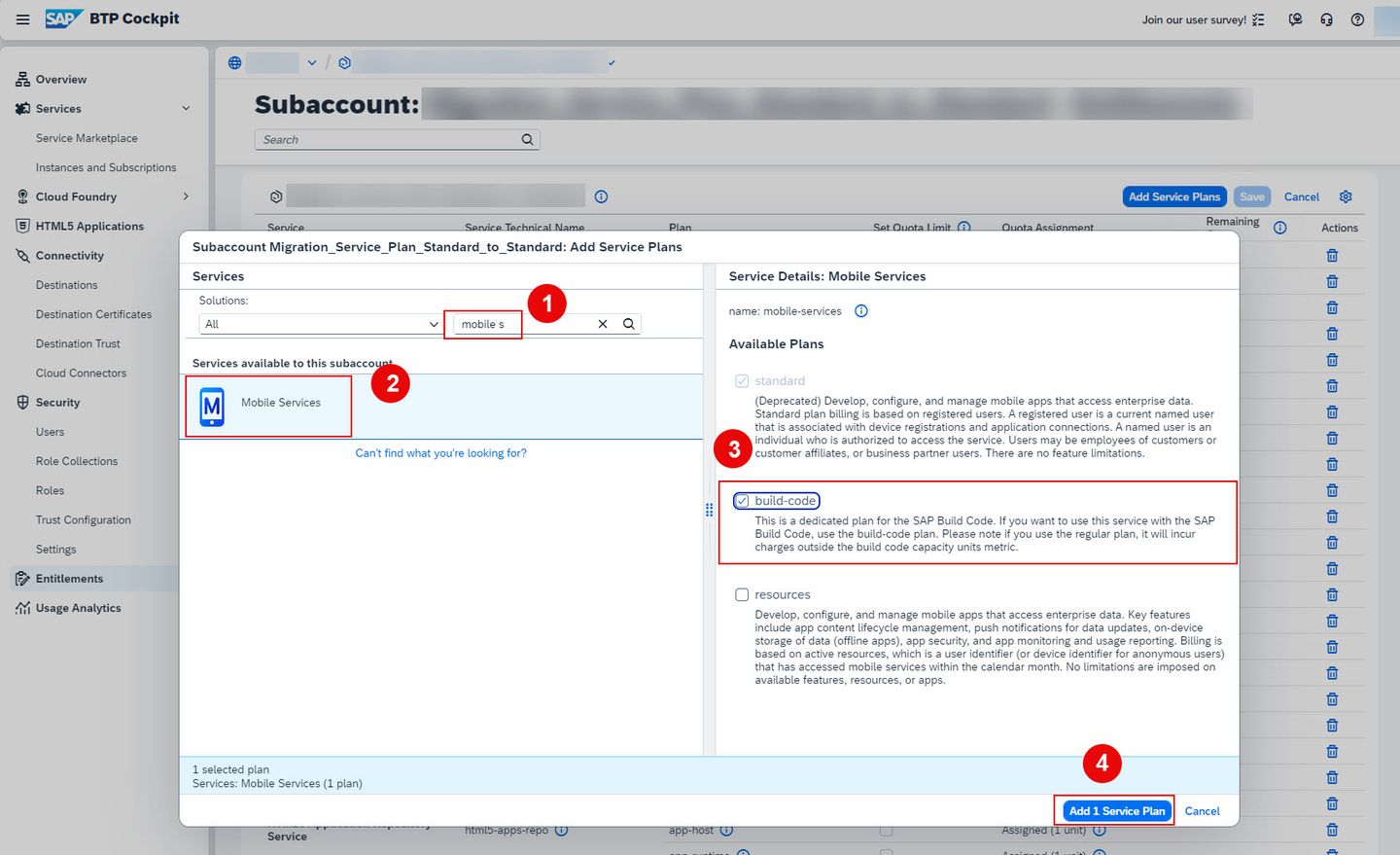
Adding build-code plan Choose Save.
You have successfully added a build-code service plan for SAP Mobile Service.
Step 2
Test yourself
Resources
Discussion
Share feedback on this tutorial or join the conversation in SAP Community.