
Extend the Bookstore with Custom Code
Extend the previously built bookstore with custom coding, for example, to validate requests.
Overview
You will learn
- How to use the CAP Java SDK
- How to use the debugger in SAP Business Application Studio


Prerequisites
Steps
Intro
In the previous tutorial, you have built the data model and exposed the services of your bookstore application. In this tutorial, you will extend the bookstore with custom code to calculate the total and netAmount elements of the Orders and OrderItems entity. In addition, when creating an order the available stock of a book will be checked and decreased.
In one of the previous tutorials, you have already seen how to register a custom event handler to handle READ or CREATE events of an entity. You used the @On annotation, which replaces the default handling of an event that is provided by the CAP Java runtime.
As we want to augment the default handling now, we’ll use the @Before and @After annotations. Event handlers registered using the @Before annotation are meant to perform validation of the input entity data. This makes it possible to validate the available stock of a particular book before creating an order. In contrast, event handlers registered using the @After annotation can post-process returned entities. This is useful for calculating the total and netAmount elements after reading orders or their items from the database.
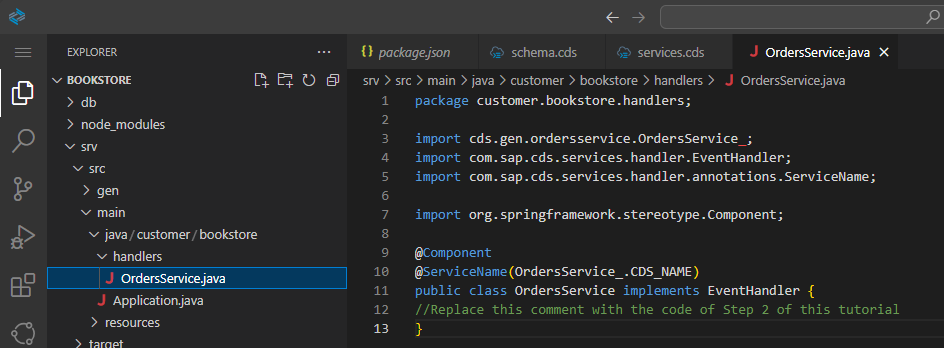
First of all, a new Java class for your event handler methods needs to be defined:
From the terminal, stop your application if it’s still running using
CTRL+C.Go to
srv/src/main/java/customer/bookstoreand create a new folder calledhandlers.
handlers package In the created package, create the
OrdersService.javafile with the following content and make sure you Save the file:
package customer.bookstore.handlers;

import cds.gen.ordersservice.OrdersService_;
import com.sap.cds.services.handler.EventHandler;
import com.sap.cds.services.handler.annotations.ServiceName;

import org.springframework.stereotype.Component;

@Component
@ServiceName(OrdersService_.CDS_NAME)
public class OrdersService implements EventHandler {
//Replace this comment with the code of Step 2 of this tutorial
}
If you see validation errors in your editor, open the context menu on your
pom.xmlin thesrvdirectory and select Reload Project. That regenerates the classes and makes them available.
You will now add a method to the OrdersService Java class to decrease the stock whenever a new order item is posted.
Add the following code to your
OrdersServiceJava class and make sure you Save the file:Java@Autowired PersistenceService db; @Before(event = CqnService.EVENT_CREATE, entity = OrderItems_.CDS_NAME) public void validateBookAndDecreaseStock(List<OrderItems> items) { for (OrderItems item : items) { String bookId = item.getBookId(); Integer amount = item.getAmount(); // check if the book that should be ordered is existing CqnSelect sel = Select.from(Books_.class).columns(b -> b.stock()).where(b -> b.ID().eq(bookId)); Books book = db.run(sel).first(Books.class) .orElseThrow(() -> new ServiceException(ErrorStatuses.NOT_FOUND, "Book does not exist")); // check if order could be fulfilled int stock = book.getStock(); if (stock < amount) { throw new ServiceException(ErrorStatuses.BAD_REQUEST, "Not enough books on stock"); } // update the book with the new stock, means minus the order amount book.setStock(stock - amount); CqnUpdate update = Update.entity(Books_.class).data(book).where(b -> b.ID().eq(bookId)); db.run(update); } } @Before(event = CqnService.EVENT_CREATE, entity = Orders_.CDS_NAME) public void validateBookAndDecreaseStockViaOrders(List<Orders> orders) { for (Orders order : orders) { if (order.getItems() != null) { validateBookAndDecreaseStock(order.getItems()); } } }Add the following import statements to the top of the
OrdersServiceJava class and make sure you Save the file:Javaimport java.util.List; import org.springframework.beans.factory.annotation.Autowired; import com.sap.cds.ql.Select; import com.sap.cds.ql.Update; import com.sap.cds.ql.cqn.CqnSelect; import com.sap.cds.ql.cqn.CqnUpdate; import com.sap.cds.services.ErrorStatuses; import com.sap.cds.services.ServiceException; import com.sap.cds.services.cds.CqnService; import com.sap.cds.services.handler.annotations.Before; import com.sap.cds.services.persistence.PersistenceService; import cds.gen.ordersservice.OrderItems; import cds.gen.ordersservice.OrderItems_; import cds.gen.ordersservice.Orders; import cds.gen.ordersservice.Orders_; import cds.gen.sap.capire.bookstore.Books; import cds.gen.sap.capire.bookstore.Books_;
Let’s break down what is happening:
The method
validateBookAndDecreaseStockis registered using the@Beforeannotation. This means that the method is called before theOrderItemsentities are persisted. The annotation also specifies, that the method should be called whenever an entityOrderItemsis created.The method has a parameter
items, which gives access to the list ofOrderItems. The interface used here is generated by CAP Java. It generates a POJO interface for each entity defined in the CDS model.The
CqnSelect selvariable defines a database query to retrieve the book that is referenced by the order item. The query is performed and the returned entity data is accessed using the POJO interface forBooks.After that the available stock of the book is compared against the ordered amount. If enough stock is available the stock is decreased on the book and the book is updated within the database.
As order items can also be created via a deep insert on the
Ordersentity, the same validation is triggered by thevalidateBookAndDecreaseStockViaOrdersmethod.
It’s important to note, that the CAP Java SDK automatically takes care of combining all database queries and updates in a single transaction. This means, that if the creation of the order item fails for some reason, the stock of the book won’t be decreased.
The complete OrdersService.java file should now have the following format:
package customer.bookstore.handlers;
import cds.gen.ordersservice.OrdersService_;
import com.sap.cds.services.handler.EventHandler;
import com.sap.cds.services.handler.annotations.ServiceName;
import org.springframework.stereotype.Component;
import java.util.List;
import org.springframework.beans.factory.annotation.Autowired;
import com.sap.cds.ql.Select;
import com.sap.cds.ql.Update;
import com.sap.cds.ql.cqn.CqnSelect;
import com.sap.cds.ql.cqn.CqnUpdate;
import com.sap.cds.services.ErrorStatuses;
import com.sap.cds.services.ServiceException;
import com.sap.cds.services.cds.CqnService;
import com.sap.cds.services.handler.annotations.Before;
import com.sap.cds.services.persistence.PersistenceService;
import cds.gen.ordersservice.OrderItems;
import cds.gen.ordersservice.OrderItems_;
import cds.gen.ordersservice.Orders;
import cds.gen.ordersservice.Orders_;
import cds.gen.sap.capire.bookstore.Books;
import cds.gen.sap.capire.bookstore.Books_;
@Component
@ServiceName(OrdersService_.CDS_NAME)
public class OrdersService implements EventHandler {
@Autowired
PersistenceService db;

@Before(event = CqnService.EVENT_CREATE, entity = OrderItems_.CDS_NAME)
public void validateBookAndDecreaseStock(List<OrderItems> items) {
    for (OrderItems item : items) {
        String bookId = item.getBookId();
        Integer amount = item.getAmount();

        // check if the book that should be ordered is existing
        CqnSelect sel = Select.from(Books_.class).columns(b -> b.stock()).where(b -> b.ID().eq(bookId));
        Books book = db.run(sel).first(Books.class)
                .orElseThrow(() -> new ServiceException(ErrorStatuses.NOT_FOUND, "Book does not exist"));

        // check if order could be fulfilled
        int stock = book.getStock();
        if (stock < amount) {
            throw new ServiceException(ErrorStatuses.BAD_REQUEST, "Not enough books on stock");
        }

        // update the book with the new stock, means minus the order amount
        book.setStock(stock - amount);
        CqnUpdate update = Update.entity(Books_.class).data(book).where(b -> b.ID().eq(bookId));
        db.run(update);
    }
}

@Before(event = CqnService.EVENT_CREATE, entity = Orders_.CDS_NAME)
public void validateBookAndDecreaseStockViaOrders(List<Orders> orders) {
    for (Orders order : orders) {
        if (order.getItems() != null) {
            validateBookAndDecreaseStock(order.getItems());
        }
    }
}
}If your OrdersService.java file still shows some errors right-click on the pom.xml in the srv directory and choose Reload Project. After closing and reopening the OrderService.java file the errors should be gone.
Go to the terminal in SAP Business Application Studio and stop your application if it’s still running by using
CTRL+C.Choose the Run Configuration icon on the side panel of SAP Business Application Studio.
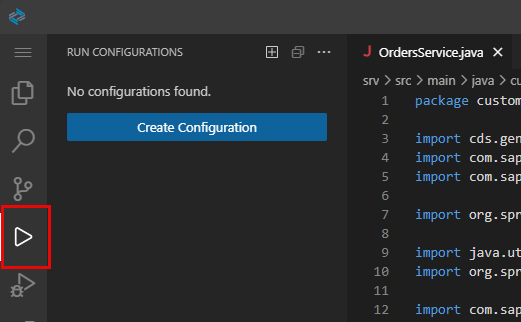
select the run configurations item Choose the Create Configuration icon (plus sign) and select
Bookstoreas your project to run. Choose Enter to confirm the name.Click the green arrow to start the application.
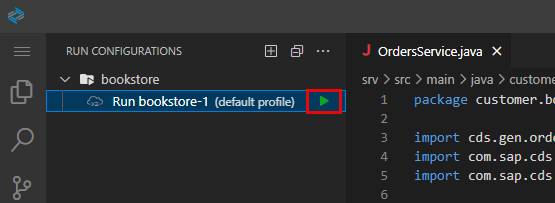
start run configuration You should see the application starting in the Debug Console.
You will now test your application using some HTTP requests. Create a new file
requests.httpin the root directory.Enter the following content in the file:
HTTP### Create Order POST http://localhost:8080/odata/v4/OrdersService/Orders Content-Type: application/json { "items": [ { "book_ID": "abed2f7a-c50e-4bc5-89fd-9a00a54b4b16", "amount": 2 } ] }Choose Send Request to execute the request.
From the index page, choose Books and you will see that the stock of the book
Wuthering Heightswas decreased to 10.You can also add
/odata/v4/BooksService/Booksto the end of your app URL. Remember the app URL is the URL created when you run your application. You may also combine the requests in the file you have created by adding a second request at the end of the file:HTTP### Read Book GET http://localhost:8080/odata/v4/BooksService/Books(abed2f7a-c50e-4bc5-89fd-9a00a54b4b16) Accept: application/jsonChoose Send Request above the second request to execute the request. You will see the current stock of the book you are ordering.
Repeat the request from step 7, until you get an error that the book ran out of stock.
Basically, by repeating the request, you’re ordering 2 books each time and therefore decreasing the stock by 2.
Next, let’s add a method to the OrdersService Java class to calculate the netAmount element of the OrderItems entity.
Add the following code to the class and make sure you Save the file:
Java@After(event = { CqnService.EVENT_READ, CqnService.EVENT_CREATE }, entity = OrderItems_.CDS_NAME) public void calculateNetAmount(List<OrderItems> items) { for (OrderItems item : items) { String bookId = item.getBookId(); // get the book that was ordered CqnSelect sel = Select.from(Books_.class).where(b -> b.ID().eq(bookId)); Books book = db.run(sel).single(Books.class); // calculate and set net amount item.setNetAmount(book.getPrice().multiply(new BigDecimal(item.getAmount()))); } }Add the following import statements to the top of the
OrdersServiceJava class and make sure you Save the file:Javaimport java.math.BigDecimal; import com.sap.cds.services.handler.annotations.After;
Let’s break it down again:
The method
calculateNetAmountis registered using the@Afterannotation. This means that the method is called after theOrderItemsentities have been read from the database. The annotation also specified, that the method should be called whenever an entityOrderItemsis read or created.The method has a parameter
itemsthat gives access to allOrderItemsentities that were either read or created.The
CqnSelect selvariable defines a database query, to retrieve the book that is referenced by the order item. The query is executed and the query result is accessed using the POJO interface forBooks.In the last line the net amount of the order item is calculated, based on the price of the book and the amount of books ordered.
Finally, add a method to the OrdersService Java class to calculate the total element of the Orders entity.
Add the following code to the class and make sure you Save the file:
Java@After(event = { CqnService.EVENT_READ, CqnService.EVENT_CREATE }, entity = Orders_.CDS_NAME) public void calculateTotal(List<Orders> orders) { for (Orders order : orders) { // calculate net amount for expanded items if(order.getItems() != null) { calculateNetAmount(order.getItems()); } // get all items of the order CqnSelect selItems = Select.from(OrderItems_.class).where(i -> i.parent().ID().eq(order.getId())); List<OrderItems> allItems = db.run(selItems).listOf(OrderItems.class); // calculate net amount of all items calculateNetAmount(allItems); // calculate and set the orders total BigDecimal total = new BigDecimal(0); for(OrderItems item : allItems) { total = total.add(item.getNetAmount()); } order.setTotal(total); } }
Let’s break down the code:
Again, the
@Afterannotation is used to register the method and to indicate that the method should be called, whenever theOrdersentity was read or created.For the order items, that may be returned as part of the operation, the net amount is calculated, reusing the
calculateNetAmountmethod. Please note that this may only be a subset of all of the order’s items.For each order, all of the order items are read from the database using the query defined in
CqnSelect selItems.For each order item, the net amount is calculated first by reusing the method
calculateNetAmount. After that all net amounts are added to the order’s total amount.
In SAP Business Application Studio stop your application if it’s still running by clicking on the stop icon in the Debug side panel.

stop debugging button Choose the Run Configuration icon on the side panel of SAP Business Application Studio.
select the run configurations item Click on the green arrow to start the application, which appears when you hover over the run configuration.
start run configuration You should see the application starting in the Debug Console.
You will now test your application using some HTTP requests. Add a new request to the file
requests.http:HTTP### Create another Order POST http://localhost:8080/odata/v4/OrdersService/Orders Content-Type: application/json { "items": [ { "book_ID": "fd0c5fda-8811-4e20-bcff-3a776abc290a", "amount": 10 } ] }Choose Send Request to execute the request.
From the index page, choose Orders. You will see that the
totalelement is filled with the calculated value.
total calculated You can also add
/odata/v4/OrdersService/Ordersto the end of your app URL.Add
/odata/v4/OrdersService/Orders?$expand=itemsto the end of your app URL.This expands the
Orderswith itsOrderItems. You will see that thenetAmountelement of theOrderItemsis calculated.
expand items of Order Stop your application by clicking on the stop icon in the Debug side panel.
stop debugging button
Great job!
You have extended the application with quite some custom business logic. In the next tutorial you will start to make the application ready for SAP BTP, by adding authentication and authorization.
Resources
Discussion
Share feedback on this tutorial or join the conversation in SAP Community.