
Create a Service Instance and Bind It to Your App
Create an instance of the Application Logging service and bind it to your app, as a way to explore how services and apps are connected on the SAP BTP, Cloud Foundry runtime.
Overview
You will learn
- How apps and services are related
- How to bind a service to an app


Prerequisites
Steps
Intro
In SAP BTP, Cloud Foundry runtime there are apps and there are services. In many cases, apps are what you write, and services are what are available for your app to make use of.
The Application Logging service enables the central capture and analysis of log messages from applications that are bound to it. You can manage the availability of services, and the instances thereof, in the SAP BTP cockpit.
In the SAP BTP cockpit, navigate to the page for your app, as you learned to do in the Deploy an App to SAP Cloud BTP, Cloud Foundry runtime tutorial.
Choose Service Bindings in the navigation area.

Choose Bind Service.

Button Bind Service Choose Service from the catalog and choose Next.

Service wizard Choose the Application Logging tile and choose Next.

Application Logging tile Choose the Create new instance option, select a service plan from the Plan field, and then choose Next.

Service Plan for Application Logging Skip specifying parameters by choosing Next.

Parameters Enter a name for the service instance and choose Finish.

Instance name
The binding is created and added to the list of service bindings:

In the text area below, enter the name of the service used in the service bindings of your application. HINT: The name appears in the Service column in the list of service bindings.
In the navigation area of the cockpit, choose Overview.
Choose Restart to restart your application.
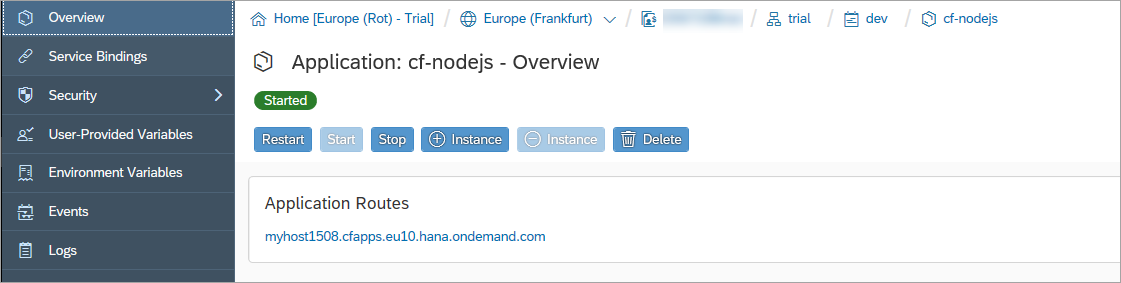
- In the Application Routes section, choose the URL to open the application.
A new tab opens that displays the app information.

In the app, you can see the additional information about the service binding.
Resources
Discussion
Share feedback on this tutorial or join the conversation in SAP Community.