
Scheduling SAP HANA Cloud Tasks
Learn different ways that SAP HANA Cloud tasks can be scheduled.
Overview
You will learn
- How stored procedures can be scheduled with the CREATE SCHEDULER JOB SQL statement
- How tasks can be scheduled using cron on Linux
- How tasks can be scheduled in the SAP Automation Pilot There are different tools that can be used to schedule commands. SAP HANA enables stored procedures to be scheduled. Linux provides a service called cron that can execute a script at a scheduled time. The SAP Automation Pilot is a service in the SAP BTP that has a feature to enable commands to be scheduled. This tutorial will demonstrate each of these methods of scheduling tasks.


Prerequisites
Prerequisites
- An SAP BTP account
- An SAP HANA Cloud instance
Steps
In this step a diagnostic script from the SQL Statement Collection for SAP HANA will be used. If you have not already done so, download SQLStatements_SHC.zip. The download section shown below is near the bottom of the SAP Note.

The script HANA_Configuration_MiniChecks_SHC.txt will be placed in a stored procedure and its output will be written to a table. The procedure can be scheduled to run once a day. It will check for configuration values that are outside of expected values.
Create a table to hold the results. Run the below SQL in the SAP HANA database explorer connected to an SAP HANA database.
SQLCREATE COLUMN TABLE DBADMIN.MINI_CHECK_RESULTS( CHID VARCHAR(5), DESCRIPTION VARCHAR(100), HOST VARCHAR(100), VALUE VARCHAR(100), EXPECTED_VALUE VARCHAR(100), C VARCHAR(1), SAP_NOTE VARCHAR(8), CHECK_TIME TIMESTAMP );Copy the contents of
HANA_Configuration_MiniChecks_SHC.txtinto a SQL console.
configuration mini checks Execute the script to ensure that it runs correctly and examine its output.

mini checks results Modify the script to only show critical errors by removing the below from approximately line 7916. Ctrl+L can be used to go to a line within the SQL console. The line numbers mentioned here are subject to change as the script is frequently updated.
SQLONLY_POTENTIALLY_CRITICAL_RESULTS = ' ' ORBelow line 688 which contains
LPAD(SAP_NOTE, 8) SAP_NOTE)add the SQL below so that each row in the table will have a timestamp.SQL, CURRENT_TIMESTAMPCreate a stored procedure and insert the results into a table by adding the following to the top of the file. The shortcut Ctrl+Home can be used to navigate to the top of the file.
SQLCREATE OR REPLACE PROCEDURE DBADMIN.HANA_Configuration_MiniChecks() LANGUAGE SQLSCRIPT AS BEGIN INSERT INTO DBADMIN.MINI_CHECK_RESULTSAt the bottom (Ctrl+End), add
SQL; END;Run the SQL to create the new procedure.
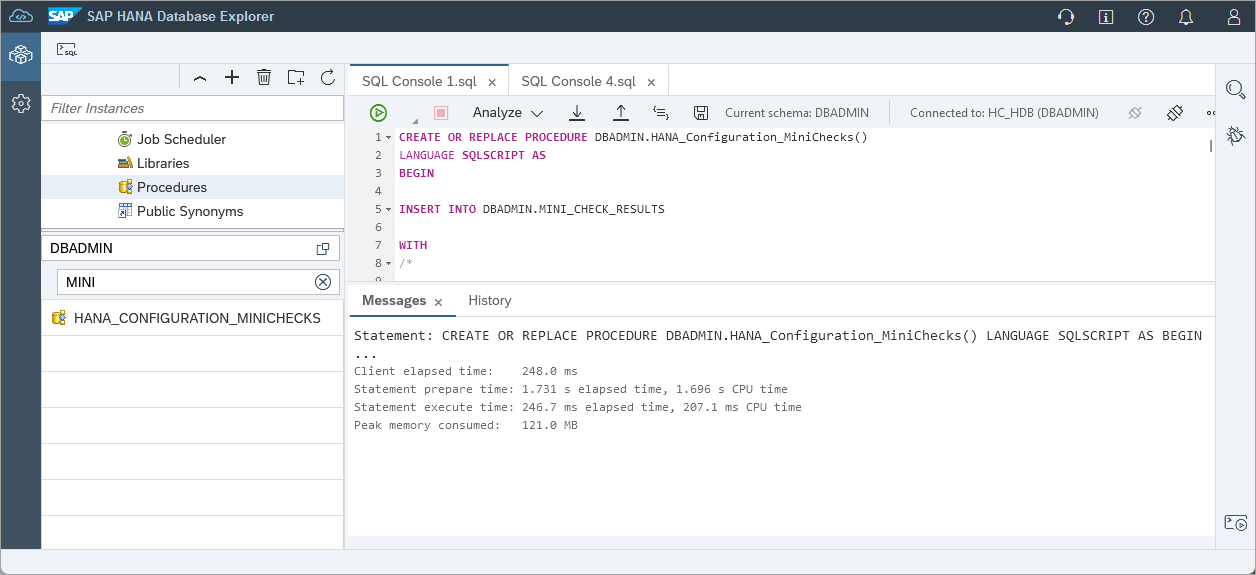
create stored procedure In a new SQL console, call the stored procedure and check the results.
SQLCALL DBADMIN.HANA_CONFIGURATION_MINICHECKS(); SELECT * FROM DBADMIN.MINI_CHECK_RESULTS;
call the procedure Notice that the table MINI_CHECK_RESULTS contains the results of the checks that occurred from running the
HANA_Configuration_MiniChecks_SHC.The procedure can now be scheduled to run at a set frequency.
SQL--Get the current date and time in UTC SELECT CURRENT_DATE, CURRENT_TIME FROM DUMMY;SQL--Schedule an event a few minutes in the future --Adjust the date and time below CREATE SCHEDULER JOB DBADMIN.MINICHECKS CRON '2023 08 28 * 17 14 0' ENABLE PROCEDURE DBADMIN.HANA_CONFIGURATION_MINICHECKS; SELECT * FROM SCHEDULER_JOBS WHERE SCHEDULER_JOB_NAME = 'MINICHECKS'; SELECT * FROM M_SCHEDULER_JOBS;The script will be run on a specified schedule and will record the results of each run in the table MINI_CHECK_RESULTS.
After the scheduled time, examine the contents of the table MINI_CHECK_RESULTS to confirm that the stored procedure was executed at the scheduled time.
SQLSELECT * FROM DBADMIN.MINI_CHECK_RESULTS;Details of scheduled jobs and their executions can also be seen under Job Scheduler in the SAP HANA database explorer’s catalog.

job schedueler If the job does not appear, check if a schema filter is set.
For additional details see Scheduling Administrative Tasks.
A job has now been scheduled within SAP HANA Cloud, SAP HANA database. It should be noted that scheduled jobs only run when the SAP HANA database is running.
The example shown in step 1 of the tutorial Executing SAP HANA Cloud tasks from the command line will now be scheduled using cron on Linux. This assumes that you have installed the SAP HANA Client. Details on installing the SAP HANA Client can be found at Install the SAP HANA Client.
The example shown below was run on an WSL 2 Ubuntu 22 instance.
If you are using openSUSE on WSL, you may need to install and start the cron service as shown below.
Shellwhich cron ps aux | grep cron su /usr/sbin/cron &
Copy the file HANA_Configuration_Overview_SHC.txt to your machine. The paths below are an example and will need to change.
Shellcp /mnt/c/SAP/SQL\ Statements/HANA_Configuration_Overview_SHC.txt /home/dan/.Create a file that will call hdbsql using your editor of choice such as pico, nano, vi, etc.
Shellpico SQLScript.shPaste following into the file after updating the folder locations to match your setup.
Shellnow=`date +"%d-%m-%Y-%H:%M"` /home/dan/sap/hdbclient/hdbsql -A -o /home/dan/results_${now}.txt -U AdminUserKey -I /home/dan/HANA_Configuration_Overview_SHC.txtDetails on using hdbuserstore were shown in the tutorial Executing SAP HANA Cloud tasks from the command line. Follow those instructions to set the host, port, user and password values for the key AdminUserKey.
Enable the file to be executed.
Shellchmod +x SQLScript.shCall the script to verify that it is correct.
Shell./SQLScript.shAn output file should be generated with the results of calling HANA_Configuration_Overview_SHC.txt
SQLcat results_*.txt
results from running SQLScript.sh Schedule the script.
Shellcrontab -eAdd the following line which instructs it be run every minute.
Shell# MIN (0-59), HOUR(0-23), Day of Month(1-31), Month(1-12), Day of Week(0-6) * * * * * /home/dan/SQLScript.sh
editing cron The names of each
View the list of scheduled tasks using the below command.
Shellcrontab -l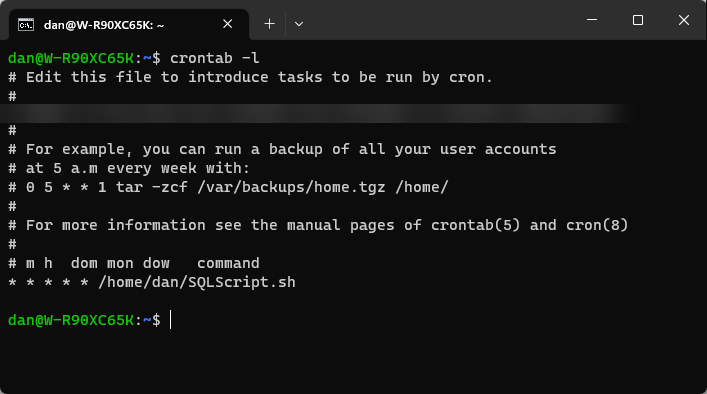
cron list crontab generator can be used to generate a different schedule for cron.
View the output after waiting for a minute.

output from cron job You may be able to further troubleshoot cron jobs or see additional details by examining the syslog.
SQLcat /var/log/syslog | grep CRONThe cron job can be stopped by deleting or commenting out the previously added line.
Shellcrontab -e
stopping a cron job
Commands such as starting and stopping an SAP HANA Cloud instance can be scheduled within the SAP Automation Pilot.

Above we can see that the command StartHC has been scheduled daily to start at UTC 11 am or 6 am EST and StopHC has been scheduled for 10 PM UTC or 5 PM EST.
Congratulations! You have now used various techniques to schedule SAP HANA Cloud tasks using SQL, cron, and the SAP Automation Pilot.
Resources
Discussion
Share feedback on this tutorial or join the conversation in SAP Community.