
Connect to Data Lake Relational Engine Using Python Drivers
Create and debug a Python application that connects to a data lake Relational Engine using the sqlanydb python driver or the pyodbc bridge.
Overview
You will learn
- How to install Python, the
sqlanydb, andpyodbcPython drivers - How to create, run, and debug a Python application that connects to and queries a data lake Relational Engine database


Prerequisites
Prerequisites
- You have completed the first 2 tutorials in this group
Steps
Intro
In the 2023 Stack Overflow’s annual developer survey, Python ranked 3rd in the Most popular technologies section. For further information on Python, see Introduction to Python 3 or The Python Tutorial.
The following steps create a simple Python app that can connect to and query an SAP HANA data lake Relational Engine.
The first step is to check if Python and pip are installed.
Enter the commands below.
Shellpython --version python3 --versionIf Python is installed, the command will return a value such as Python 3.13.0
In some Linux distributions, ‘python’ refers to Python 2, while ‘python3’ refers to Python 3. However, as Python 2 is now obsolete, ‘python’ may refer to Python 3 instead. It may also be referred to by its specific version such as python3.13.
If Python is not installed, it can be downloaded from Python downloads.
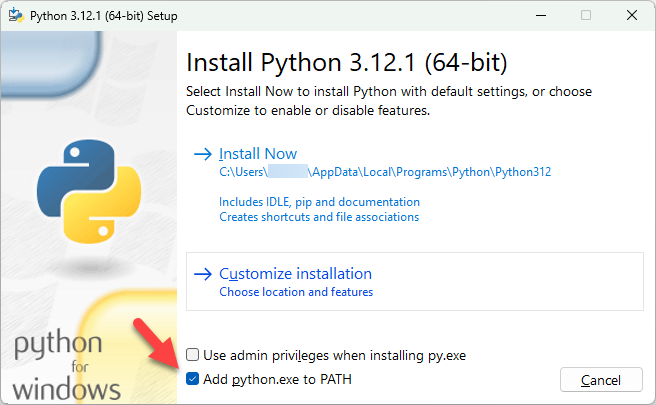
On Microsoft Windows, check the box that says Add Python 3.x to PATH as shown below to ensure that the interpreter will be placed in your path. The Microsoft Windows command prompt or shell will need to be reopened after Python is installed to pick up the path to python.
python-install On OpenSUSE Tumbleweed, yast can be used to install python313. Once it has been installed its version can be seen with the below command.
Shellpython3.13 --versionEnter the commands below.
Shellpip --version pip3 --version pip install --upgrade pipIf you encounter issues with user permissions, run command prompt as an administrator and try again.
The standard package installer for Python is pip. The following commands will check the version of pip and attempt to upgrade it to the latest available version.
On Linux, if you encounter permission issues, one way to solve the issue is to use
sudobefore the command.On Linux, if Python is installed but pip is not, it can be installed on openSUSE using Zypper as shown below.
Shellzypper install python3-pip
Code
The sqlanydb package is the python driver for the data lake Relational Engine and is available as part of the data lake Relational Engine install and is available at PyPI.
Navigate to your Data Lake Client installation folder and enter the following command to install the python driver named
sqlanydb.Shellcd %HDL_CLIENT_HOME%\SDK\Python pip install sqlanydb-1.0.14.tar.gzOn Linux the rest of the steps will be executed in a virtual environment.
First make a project folder, and create a virtual environment inside it. To do so, open the terminal app, write the following command, and hit return, here pyvenv is the name of the folder that you wish to create the virtual environment in.
Shell(Linux)mkdir $HOME/pyvenvNow, use the venv command to create a virtual environment inside the given folder, here python-virtualenv is the name of the virtual environment that is to be created.
Shell(Linux)cd $HOME/pyvenv python3 -m venv pyvenv/python-virtualenvWe now activate the virtual environment, which we will use to complete the rest of the steps for linux based systems.
Shell(Linux)source pyvenv/python-virtualenv/bin/activateA successful activation looks like this:-

python-install Now install the driver named ‘sqlanydb’.
Shellcd $HDL_CLIENT_HOME/sdk/python pip install sqlanydb-1.0.14.tar.gz
In a shell, create a folder named
python-sqlanydb, enter the newly created directory, and open a file namepythonQuery.pyin an editor.Shellmkdir %HOMEPATH%\DataLakeClientsTutorial\python-sqlanydb cd %HOMEPATH%\DataLakeClientsTutorial\python-sqlanydb notepad pythonQuery.pySubstitute
picobelow for your preferred text editor.Shellmkdir -p $HOME/DataLakeClientsTutorial/python-sqlanydb cd $HOME/DataLakeClientsTutorial/python-sqlanydb pico pythonQuery.pyCopy the following code into
pythonQuery.py. Replace the host value.Python#Import your dependencies import sqlanydb #Initialize your connection conn = sqlanydb.connect(uid='USER1', pwd='Password1', host='XX.iq.hdl.trial-us10.hanacloud.ondemand.com:443',enc='TLS{tls_type=rsa;direct=yes}') #If no errors, print connected print('connected') curs = conn.cursor() sql_command = "select TITLE, FIRSTNAME, NAME from HOTELS.CUSTOMER;" curs.execute(sql_command) rows = curs.fetchall() for row in rows: for col in row: print ("%s" % col, end=" ") print (" ") curs.close() conn.close()Save and close
pythonQuery.py. Run the app. Make sure your data lake Relational Engine is running before executing the app.Shellpython pythonQuery.py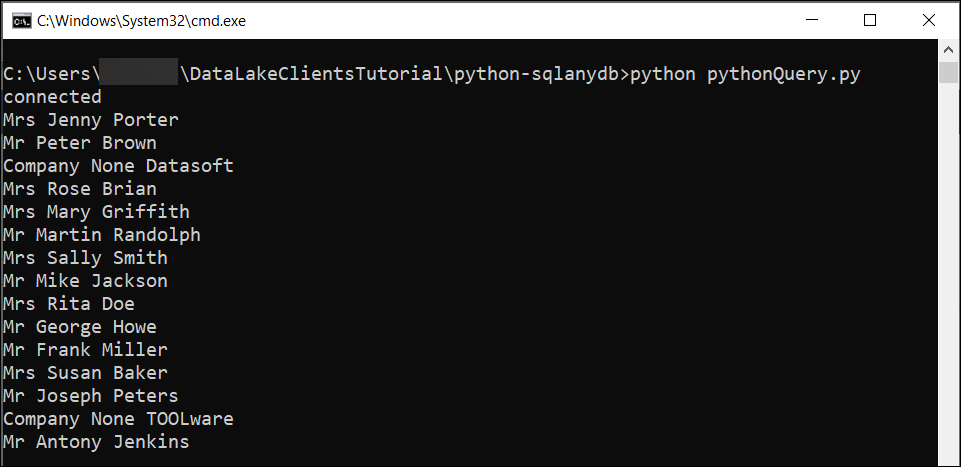
python Query
For further information on the Python Driver, visit Python and Database Access.
This is an alternate method of connecting to a data lake Relation Engine from a Python app. The Python ODBC bridge is an open source Python module available on PyPI. The performance characteristics between the two drivers may vary depending on the use case.
Ensure that you have created a connection to the data lake Relational Engine using ODBC as shown in step 1 (Windows) or 2 (Linux) of the Connect to Data Lake Relational Engine Using the ODBC Driver tutorial.
The repository that contains Python packages is PyPI and includes a package for the
pyodbcdriver.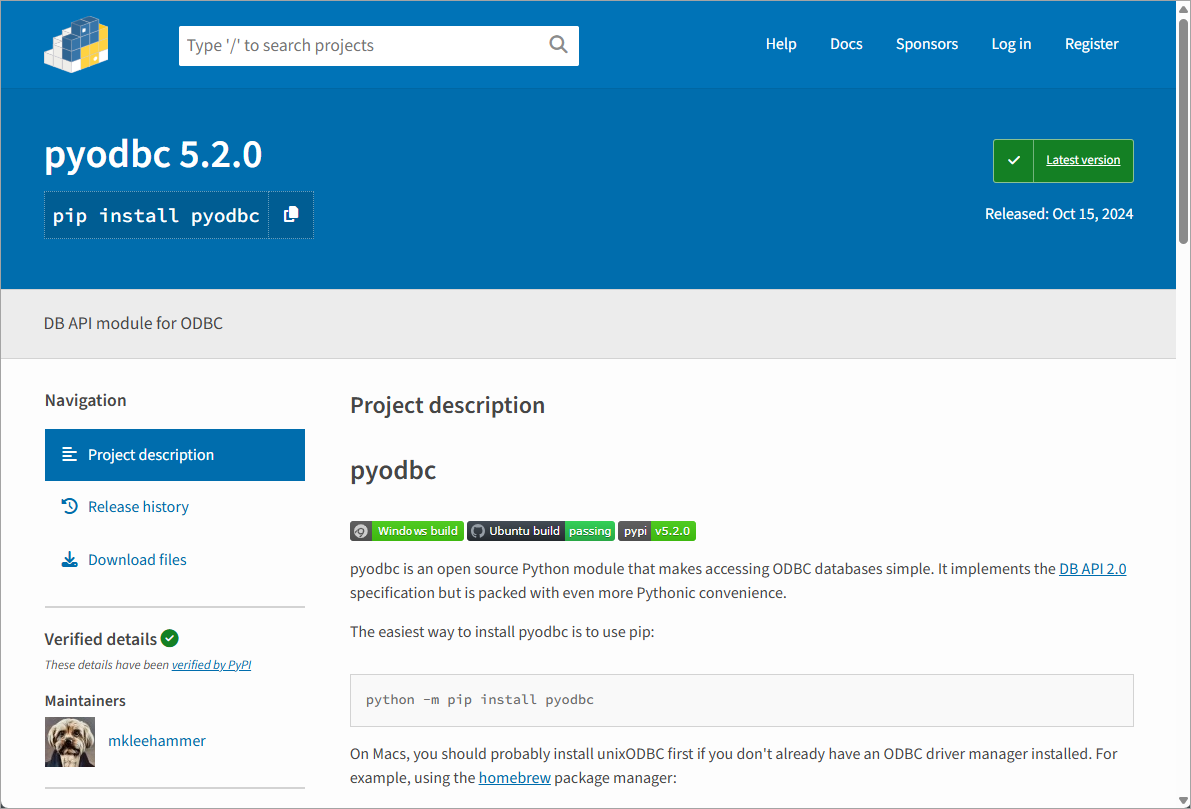
pyodbc on PyPI Install
pyodbcShellpip install pyodbcIf this command fails on Microsoft Windows with an error “Microsoft Visual C++ 14.0 is required”, additional details can be found at Unable to install pyodbc using python 3.10 in windows 10 and Release python 3.10 win wheels for pyodbc.
If this command fails on Linux, you may need to install gcc-c++, python3-devel, and unixodbc-dev.
In a shell, create a folder named
python-pyodbc, enter the newly created directory, and open a file namepythonQuery.pyin an editor.Shellmkdir %HOMEPATH%\DataLakeClientsTutorial\python-pyodbc cd %HOMEPATH%\DataLakeClientsTutorial\python-pyodbc notepad pythonQuery.pySubstitute
picobelow for your preferred text editor.Shellmkdir -p $HOME/DataLakeClientsTutorial/python-pyodbc cd $HOME/DataLakeClientsTutorial/python-pyodbc pico pythonQuery.pyCopy the following code into
pythonQuery.py.Python#Import your dependencies import pyodbc #Initialize your connection conn = pyodbc.connect(uid='USER1',pwd='Password1',dsn='HC_DL') #If no errors, print connected print('connected') curs = conn.cursor() sql_command = "select TITLE, FIRSTNAME, NAME from HOTELS.CUSTOMER;" curs.execute(sql_command) rows = curs.fetchall() for row in rows: for col in row: print ("%s" % col, end= " ") print (" ") curs.close() conn.close()Save and close
pythongQuery.py.The
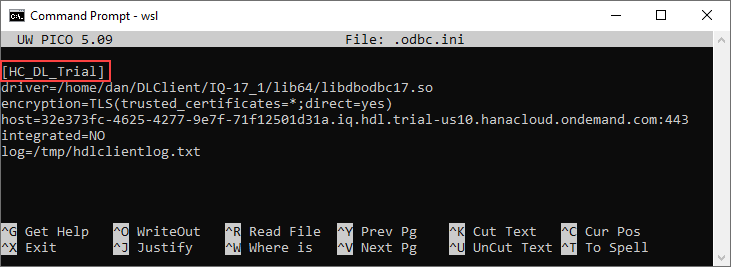
dsnvalue refers to the data source name in the Microsoft Windows ODBC Administrator or the Linux.odbc.inifile.
ODBC Administrator or
unix Run the app.
Shellpython pythonQuery.pyOn some Linux distributions, python refers to a 2.x version of Python. If so, replace
pythonwithpython3.
python Query
The code in pythonQuery.py uses PEP 249 – Python Database API Specification, which defines a set of methods that provide a consistent database interface, independent of the actual database being used.
Visual Studio Code provides plugins for Python and can be used to debug an application.
If you have not already done so, download Visual Studio Code.
If you have not already done so, in Visual Studio Code, choose File | Add Folder to Workspace, and then add the
DataLakeClientsTutorialfolder.
Workspace Open the file
pythonQuery.py.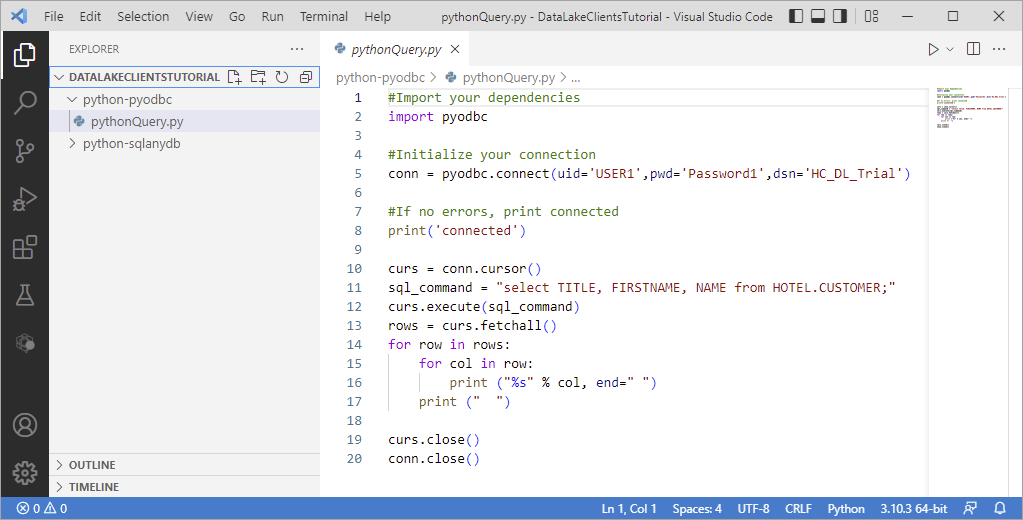
Python File Visual Studio Code will recognize the
pyfile extension and will suggest installing the Python extension. Click Install.Place a breakpoint on line the line
for row in rows:.Select Run | Start Debugging | Python File Debug the currently active Python file.
Notice that the program stops running at the breakpoint that was set.
Observe the variable values in the leftmost pane. Step through code.
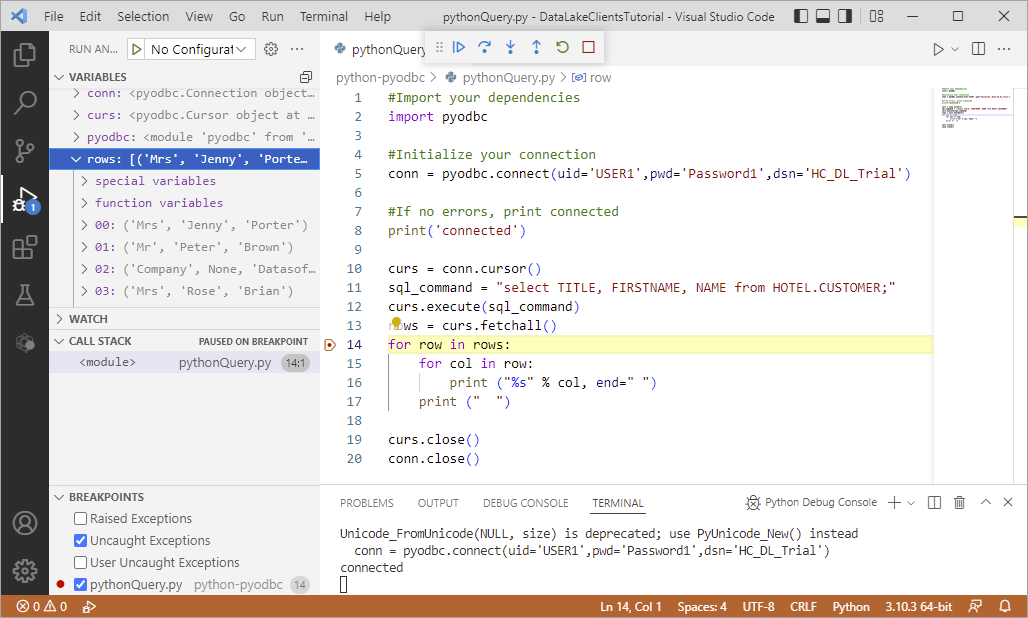
VS Code Debugging
Congratulations! You have now created and debugged a Python application that connects to and queries a data lake Relational Engine database.
Resources
Discussion
Share feedback on this tutorial or join the conversation in SAP Community.