
Overview
You will learn
- How to create SQLScript User Defined Libraries


Prerequisites
Prerequisites
- This tutorial is designed for SAP HANA Cloud.
- Tutorials: Creating Table User Defined Functions
Steps
Intro
Libraries are designed to group related variables, functions, and procedures together within a common object. These library members can either be exposed using the PULBIC keyword, or set to only be consumable from within the library itself using the PRIVATE keyword.
Return to the SAP Business Application Studio and right click on the
srcfolder and choose New Folder.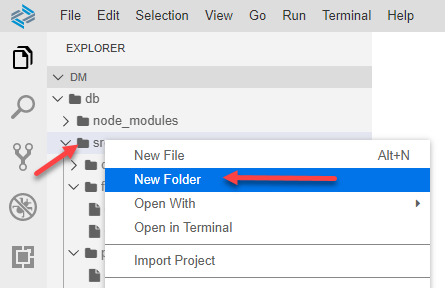
editor Enter the name of the folder as libraries and click OK.
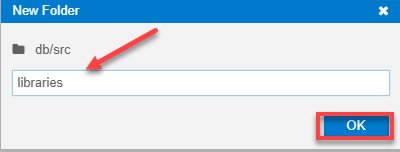
dialog Use what you have learned in previous tutorials and create a new SAP HANA Database Artifact using the SAP HANA: Create SAP HANA Database Artifact command from the View menu.

command Make sure to select the
librariesfolder, and choose Library as the Artifact Type, then give the name asmasterdata. Click Create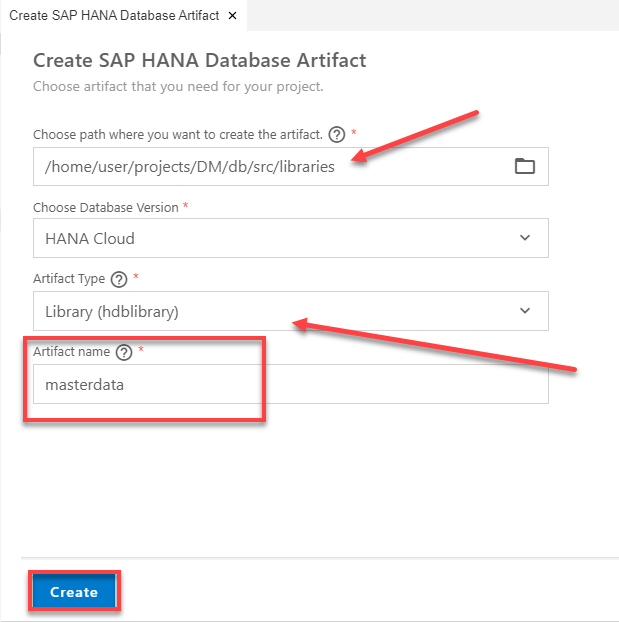
wizard
Click on the new
masterdata.hdblibraryfile in thelibrariesfolder and the editor should open with the shell of the library.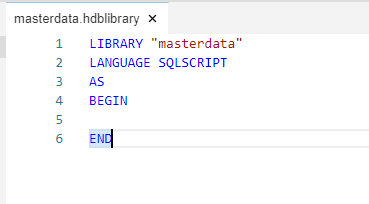
editor Between the BEGIN and END statements, define a public variable library member called
rowcountwith type int.SQLScriptpublic variable rowcount int;After the public variable, define a public function library member as shown here.
SQLScriptpublic function "employee_exists"( in im_employee_id nvarchar(36) ) returns res boolean as begin declare lv_count int; select count(*) into lv_count from "OPENSAP_MD_EMPLOYEES" where id = im_employee_id; if lv_count > 0 then res = true; else res = false; end if; end;After the public function, define two public procedure library members, one called
get_employee_dataand the otherget_business_partner_data.SQLScriptpublic procedure "get_employee_data"( out ex_employees "OPENSAP_MD_EMPLOYEES" ) LANGUAGE SQLSCRIPT SQL SECURITY INVOKER AS begin ex_employees = select * from "OPENSAP_MD_EMPLOYEES"; rowcount = record_count(:ex_employees); end; public procedure "get_business_partner_data"( out ex_businesspartners "OPENSAP_MD_BUSINESSPARTNERS" ) LANGUAGE SQLSCRIPT SQL SECURITY INVOKER AS begin ex_businesspartners = select * from "OPENSAP_MD_BUSINESSPARTNERS"; rowcount = record_count(:ex_businesspartners); end;The complete code should look like this.
SQLScriptLIBRARY "masterdata" LANGUAGE SQLSCRIPT AS BEGIN public variable rowcount int; public function "employee_exists"( in im_employee_id nvarchar(36) ) returns res boolean as begin declare lv_count int; select count(*) into lv_count from "OPENSAP_MD_EMPLOYEES" where id = im_employee_id; if lv_count > 0 then res = true; else res = false; end if; end; public procedure "get_employee_data"( out ex_employees "OPENSAP_MD_EMPLOYEES" ) LANGUAGE SQLSCRIPT SQL SECURITY INVOKER AS begin ex_employees = select * from "OPENSAP_MD_EMPLOYEES"; rowcount = record_count(:ex_employees); end; public procedure "get_business_partner_data"( out ex_businesspartners "OPENSAP_MD_BUSINESSPARTNERS" ) LANGUAGE SQLSCRIPT SQL SECURITY INVOKER AS begin ex_businesspartners = select * from "OPENSAP_MD_BUSINESSPARTNERS"; rowcount = record_count(:ex_businesspartners); end; ENDSave your work.
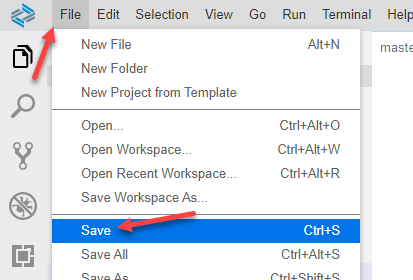
save
Use what you have learned and create a new procedure in the procedures folder called
get_master_data. Because our library procedures actually update the library variable, we need our consuming procedure to be Read/Write as well, so make sure to remove the READS SQL DATA from this procedure as shown.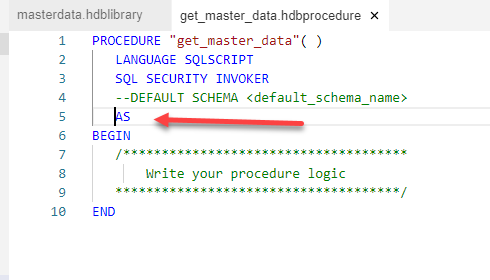
save Enter the output parameters in the signature of the procedure.
SQLScriptout ex_emp_exists boolean, out ex_employees "OPENSAP_MD_EMPLOYEES" , out ex_emp_count int, out ex_business_partners "OPENSAP_MD_BUSINESSPARTNERS", out ex_bp_count intEnter code between the BEGIN and END statements. First call the library member scalar function called
employee_existsand pass the result to the output parameter. Next, call the library member procedures and pass the result to the output parameters as well as pass the library member variablerowcountto the output parameters.SQLScriptex_emp_exists = "masterdata":"employee_exists"('02BD2137-0890-1EEA-A6C2-BB55C19787FB'); call "masterdata":"get_employee_data"( ex_employees ); ex_emp_count = "masterdata":rowcount; call "masterdata":"get_business_partner_data"( ex_business_partners ); ex_bp_count = "masterdata":rowcount;The completed code should look similar to this.
SQLScriptPROCEDURE "get_master_data"( out ex_emp_exists boolean, out ex_employees "OPENSAP_MD_EMPLOYEES" , out ex_emp_count int, out ex_business_partners "OPENSAP_MD_BUSINESSPARTNERS", out ex_bp_count int ) LANGUAGE SQLSCRIPT SQL SECURITY INVOKER --DEFAULT SCHEMA <default_schema_name> AS BEGIN ex_emp_exists = "masterdata":"employee_exists"('02BD2137-0890-1EEA-A6C2-BB55C19787FB'); call "masterdata":"get_employee_data"( ex_employees ); ex_emp_count = "masterdata":rowcount; call "masterdata":"get_business_partner_data"( ex_business_partners ); ex_bp_count = "masterdata":rowcount; END
Use what you have learned and Save your work, then perform a Deploy. Finally return to the Database Explorer and call the procedure
get_master_dataand check the results. Check the result on each tab. Scalar results are grouped into a single tab, in this case ‘Result 3’.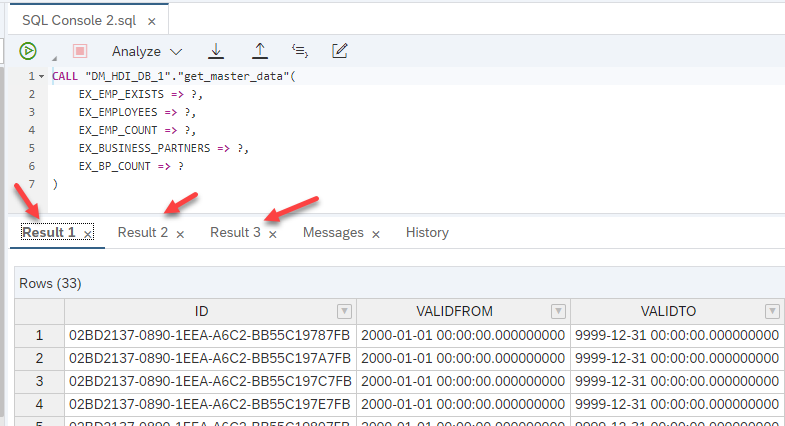
save
Resources
Discussion
Share feedback on this tutorial or join the conversation in SAP Community.