
Use Table Variable Operators
Leverage SQLScript in stored procedures, user defined functions, and user defined libraries.
Overview
You will learn
- How to update procedure to use Table Variable Operators to manipulate the immediate table variables


Prerequisites
Prerequisites
- This tutorial is designed for SAP HANA Cloud.
- Tutorials: Using Index Based Cell Access
Steps
Intro
In this tutorial, you will update the previous procedure to now use Table Variable Operators to manipulate the immediate table variables. We can use table variable operators to perform DML like operations on table variables without having to invoke the SQL layer. In this exercise, we will experiment with the INSERT, UPDATE, DELETE, and SEARCH operators.
Return to the procedure called
build_productsin the procedure folder.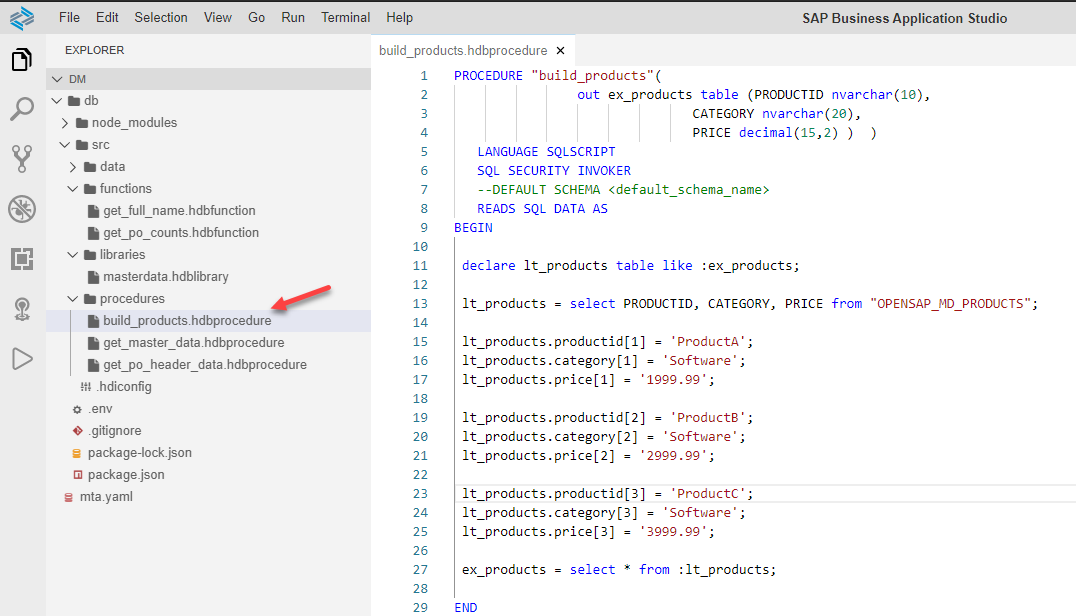
procedure editor Remove the code inside the body, between the BEGIN and END statements leaving only the two lines shown here.
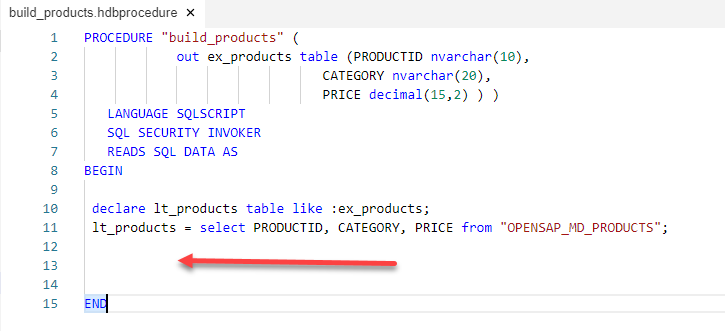
remove After the SELECT statement, Use the INSERT operator to copy all rows of
lt_productsinto the output parameter calledex_products. Then use the INSERT operator to insert 3 new products into the output table. Since you are specifying the actual index, it will insert your new rows at that index and push all existing rows down.
:ex_products.INSERT(:lt_products);
:ex_products.INSERT(('ProductA', 'Software', '1999.99'), 1);
:ex_products.INSERT(('ProductB', 'Software', '2999.99'), 2);
:ex_products.INSERT(('ProductC', 'Software', '3999.99'), 3);
The complete code should look very similar to this.
SQLScriptPROCEDURE "build_products" ( out ex_products table (PRODUCTID nvarchar(10), CATEGORY nvarchar(20), PRICE decimal(15,2) ) ) LANGUAGE SQLSCRIPT SQL SECURITY INVOKER READS SQL DATA AS BEGIN declare lt_products table like :ex_products; lt_products = select PRODUCTID, CATEGORY, PRICE from "OPENSAP_MD_PRODUCTS"; :ex_products.INSERT(:lt_products); :ex_products.INSERT(('ProductA', 'Software', '1999.99'), 1); :ex_products.INSERT(('ProductB', 'Software', '2999.99'), 2); :ex_products.INSERT(('ProductC', 'Software', '3999.99'), 3); ENDUse what you have learned and Save your work, and perform a Deploy. Then return to the Database Explorer and call the procedure. In the Results tab, you should see the product data including the new products that you have inserted.
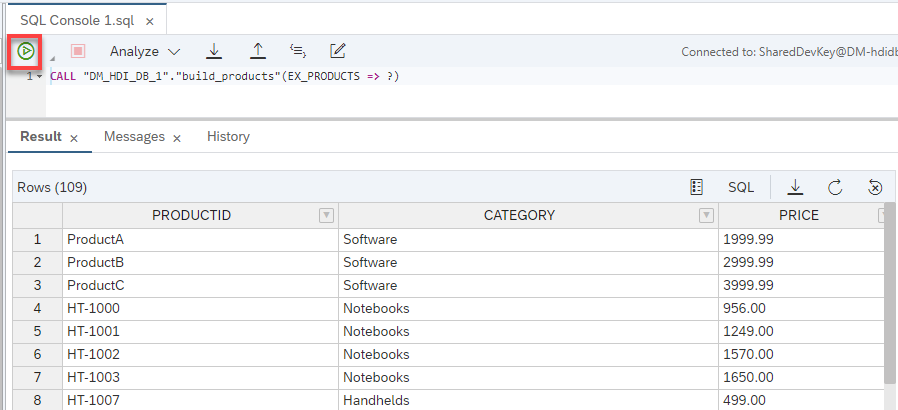
results
Return to the procedure and further modify it. Enter another DECLARE statement for
lv_index.SQLScriptdeclare lv_index int = 0;Also add a FOR loop to loop through the rows and update the price using the UDPATE operator
SQLScriptFOR lv_index IN 1..record_count(:ex_products) DO :ex_products.(PRICE).UPDATE((:ex_products.PRICE[lv_index] * 1.25), lv_index); END FOR;The complete code should look very similar to this.
SQLScriptPROCEDURE "build_products" ( out ex_products table (PRODUCTID nvarchar(10), CATEGORY nvarchar(20), PRICE decimal(15,2) ) ) LANGUAGE SQLSCRIPT SQL SECURITY INVOKER READS SQL DATA AS BEGIN declare lt_products table like :ex_products; declare lv_index int = 0; lt_products = select PRODUCTID, CATEGORY, PRICE from "OPENSAP_MD_PRODUCTS"; :ex_products.INSERT(:lt_products); :ex_products.INSERT(('ProductA', 'Software', '1999.99'), 1); :ex_products.INSERT(('ProductB', 'Software', '2999.99'), 2); :ex_products.INSERT(('ProductC', 'Software', '3999.99'), 3); FOR lv_index IN 1..record_count(:ex_products) DO :ex_products.(PRICE).UPDATE((:ex_products.PRICE[lv_index] * 1.25), lv_index); END FOR; ENDUse what you have learned and Save your work, and perform a Deploy. Then return to the Database Explorer and call the procedure. In the Results tab, you should see the product data including the new products that you have inserted and now the prices have been increased.
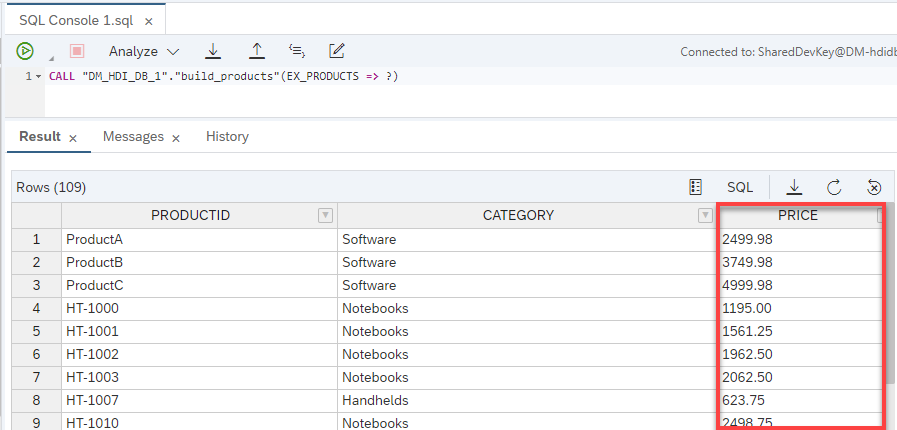
results
Return to the procedure and further modify it. Enter two new DECLARE statements.
SQLScriptdeclare lv_del_index int array; declare lv_array_index int = 0;Also add a FOR loop determine which lines to delete, and finally use the DELETE operator to delete the rows all at once.
SQLScriptFOR lv_index IN 1..record_count(:ex_products) DO IF :ex_products.PRICE[lv_index] <= 2500.00 THEN lv_array_index = lv_array_index + 1; lv_del_index[lv_array_index] = lv_index; END IF; END FOR; :ex_products.DELETE(:lv_del_index);The complete code should look very similar to this.
SQLScriptPROCEDURE "build_products" ( out ex_products table (PRODUCTID nvarchar(10), CATEGORY nvarchar(20), PRICE decimal(15,2) ) ) LANGUAGE SQLSCRIPT SQL SECURITY INVOKER READS SQL DATA AS BEGIN declare lt_products table like :ex_products; declare lv_index int = 0; declare lv_del_index int array; declare lv_array_index int = 0; lt_products = select PRODUCTID, CATEGORY, PRICE from "OPENSAP_MD_PRODUCTS"; :ex_products.INSERT(:lt_products); :ex_products.INSERT(('ProductA', 'Software', '1999.99'), 1); :ex_products.INSERT(('ProductB', 'Software', '2999.99'), 2); :ex_products.INSERT(('ProductC', 'Software', '3999.99'), 3); FOR lv_index IN 1..record_count(:ex_products) DO :ex_products.(PRICE).UPDATE((:ex_products.PRICE[lv_index] * 1.25), lv_index); END FOR; FOR lv_index IN 1..record_count(:ex_products) DO IF :ex_products.PRICE[lv_index] <= 2500.00 THEN lv_array_index = lv_array_index + 1; lv_del_index[lv_array_index] = lv_index; END IF; END FOR; :ex_products.DELETE(:lv_del_index); ENDUse what you have learned and Save your work, and perform a Deploy. Then return to the Database Explorer and call the procedure. In the Results tab, you should see the product data that is left after the DELETE operation has been performed.
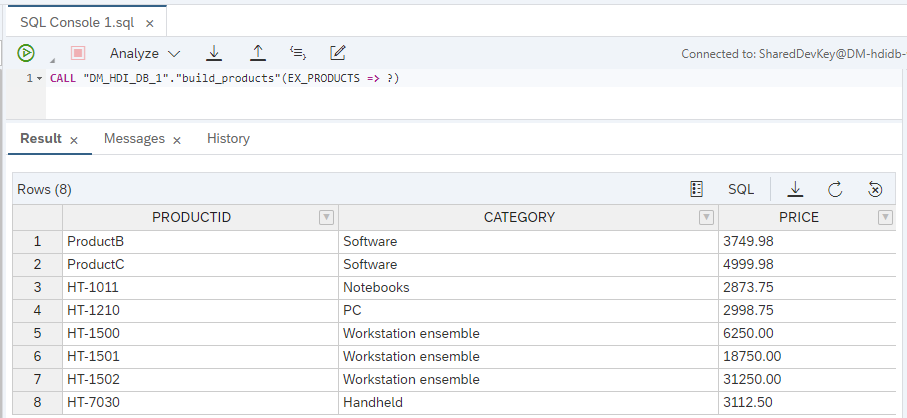
results
Return to the procedure and further modify it. Enter code for a new output parameter.
SQLScriptout ex_pc_productid nvarchar(10)Also add the two lines of code for performing a SEARCH on the intermediate table variable.
SQLScriptlv_index = :ex_products.SEARCH("CATEGORY", 'PC', 1); ex_pc_productid = :ex_products.PRODUCTID[lv_index];The complete code should look very similar to this.
SQLScriptPROCEDURE "build_products" ( out ex_products table (PRODUCTID nvarchar(10), CATEGORY nvarchar(20), PRICE decimal(15,2) ), out ex_pc_productid nvarchar(10) ) LANGUAGE SQLSCRIPT SQL SECURITY INVOKER READS SQL DATA AS BEGIN declare lt_products table like :ex_products; declare lv_index int = 0; declare lv_del_index int array; declare lv_array_index int = 0; lt_products = select PRODUCTID, CATEGORY, PRICE from "OPENSAP_MD_PRODUCTS"; :ex_products.INSERT(:lt_products); :ex_products.INSERT(('ProductA', 'Software', '1999.99'), 1); :ex_products.INSERT(('ProductB', 'Software', '2999.99'), 2); :ex_products.INSERT(('ProductC', 'Software', '3999.99'), 3); FOR lv_index IN 1..record_count(:ex_products) DO :ex_products.(PRICE).UPDATE((:ex_products.PRICE[lv_index] * 1.25), lv_index); END FOR; FOR lv_index IN 1..record_count(:ex_products) DO IF :ex_products.PRICE[lv_index] <= 2500.00 THEN lv_array_index = lv_array_index + 1; lv_del_index[lv_array_index] = lv_index; END IF; END FOR; :ex_products.DELETE(:lv_del_index); lv_index = :ex_products.SEARCH("CATEGORY", 'PC', 1); ex_pc_productid = :ex_products.PRODUCTID[lv_index]; ENDUse what you have learned and Save your work, and perform a Deploy. Then return to the Database Explorer and call the procedure. In the Results tab, you should see the product data that is left after the DELETE operation has been performed in the first tab, and on the second results tab you should see the product id of the first row which category was equal to “PC”.
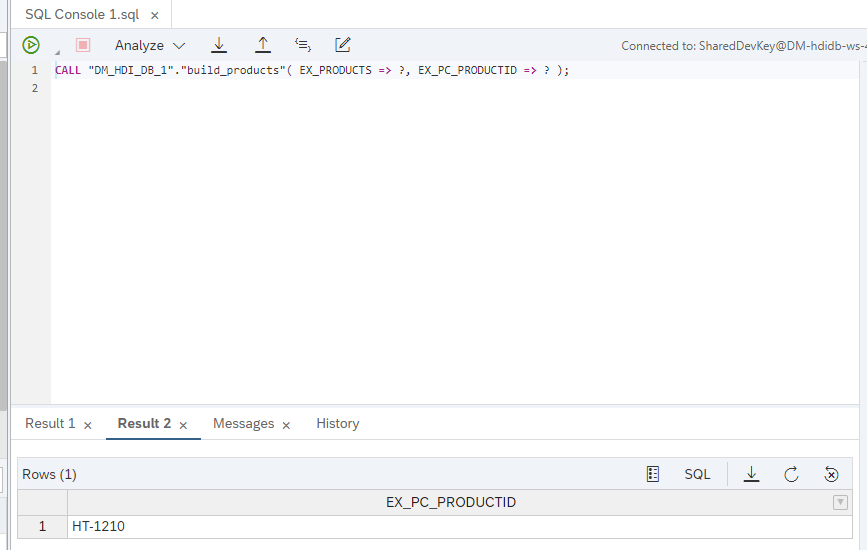
results
Resources
Discussion
Share feedback on this tutorial or join the conversation in SAP Community.