
Intermediate Table Variables
Leverage SQLScript in stored procedures, user defined functions, and user defined libraries.
Overview


Prerequisites
Prerequisites
- This tutorial is designed for SAP HANA Cloud.
- Tutorials: Parallel Processing and Parameters
Steps
Return to your procedure called
get_po_header_data.
Existing Procedure Delete the output parameters which you defined in the last section.

Define output Define a new output parameter as shown

New output Rename
EX_PO_CREATE_CNTtoPO_CREATE_CNT. Also renameEX_PO_CHANGE_CNTtoPO_CHANGE_CNT
change name Modify the two SELECT statements and add
AS EIDafter theCREADEDBYandMODIFIEDBYfields.
modify select Next, add another SELECT statement after the 2 previous SELECT statements as shown. This statement uses the previously defined table variables.

add another select The completed code should be very similar to this.
SQLScriptPROCEDURE "get_po_header_data"( OUT EX_TOP_3_EMP_PO_COMBINED_CNT TABLE( LOGINNAME NVARCHAR(12), CREATE_CNT INTEGER, CHANGE_CNT INTEGER, COMBINED_CNT INTEGER ) ) LANGUAGE SQLSCRIPT SQL SECURITY INVOKER --DEFAULT SCHEMA <default_schema_name> READS SQL DATA AS BEGIN po_create_cnt = SELECT COUNT(*) AS CREATE_CNT, "CREATEDBY" as EID FROM "OPENSAP_PURCHASEORDER_HEADERS" WHERE ID IN ( SELECT "POHEADER_ID" FROM "OPENSAP_PURCHASEORDER_ITEMS" WHERE "PRODUCT_PRODUCTID" IS NOT NULL) GROUP BY "CREATEDBY"; po_change_cnt = SELECT COUNT(*) AS CHANGE_CNT, "MODIFIEDBY" as EID FROM "OPENSAP_PURCHASEORDER_HEADERS" WHERE ID IN ( SELECT "POHEADER_ID" FROM "OPENSAP_PURCHASEORDER_ITEMS" WHERE "PRODUCT_PRODUCTID" IS NOT NULL) GROUP BY "MODIFIEDBY"; EX_TOP_3_EMP_PO_COMBINED_CNT = SELECT emp.LOGINNAME, crcnt.CREATE_CNT, chcnt.CHANGE_CNT, crcnt.CREATE_CNT + chcnt.CHANGE_CNT AS COMBINED_CNT FROM "OPENSAP_MD_EMPLOYEES" as emp LEFT OUTER JOIN :PO_CREATE_CNT AS crcnt ON emp.email = crcnt.EID LEFT OUTER JOIN :PO_CHANGE_CNT AS chcnt ON emp.email = chcnt.EID ORDER BY COMBINED_CNT DESC LIMIT 3; END
Save the procedure.

save Procedure Perform a Deploy.
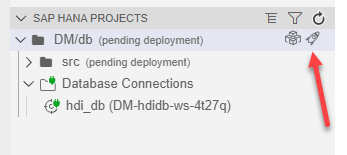
deploy Return to the Database Explorer page and use what you have learned and generate a new call statement for the procedure and run it. The results are then shown.
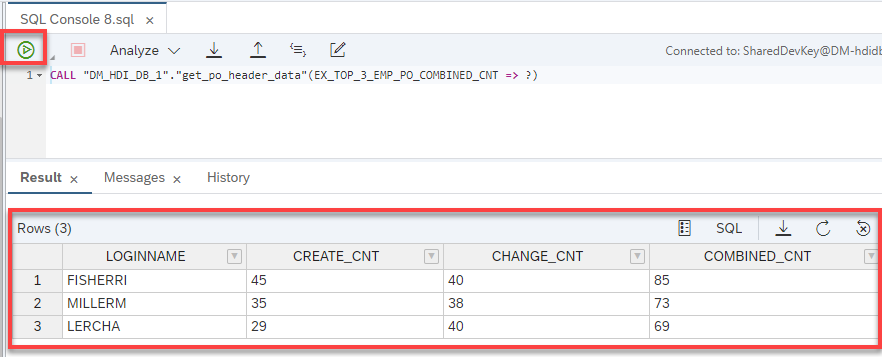
Results
Resources
Discussion
Share feedback on this tutorial or join the conversation in SAP Community.