
Overview


Prerequisites
Prerequisites
- Proficiency: Beginner
Steps
Time to Complete
20 Min
To complete this tutorial, you will need:
- Eclipse IDE for Java EE Developers Neon or newer (other Eclipse packages may require to manually install additional components)
You will also need an instance of SAP HANA 2.0, express edition (SPS02 revision 24 or newer). Both packages, the Server only and Server + Applications, will work.
To get your instance up and running, you can check the available options and get started on the SAP HANA, express edition product page.
Open the Eclipse IDE.
Create a new Maven project by selecting File -> New -> Maven Project from the menu bar.

Note: if you can’t find the Maven Project entry in the menu as in the above screenshot, then use the Other option and search for Maven Project
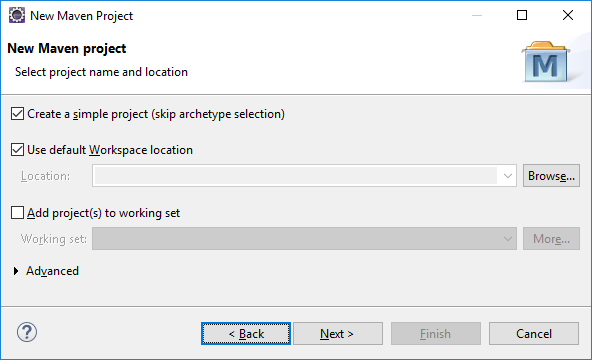
Check Create a simple project and click on Next.
Click on Next again
Note: after you click on Next, the Maven Archetype will be downloaded. If you receive errors like Could not resolve archetype, it is likely that your Maven repository is either corrupted or not properly configured to use a proxy. Refer to the Maven Configuring a proxy documentation.
Next, enter a group ID (like com.sap.hana.hibernate), an artefact ID (like tutorial) and package name for the project.
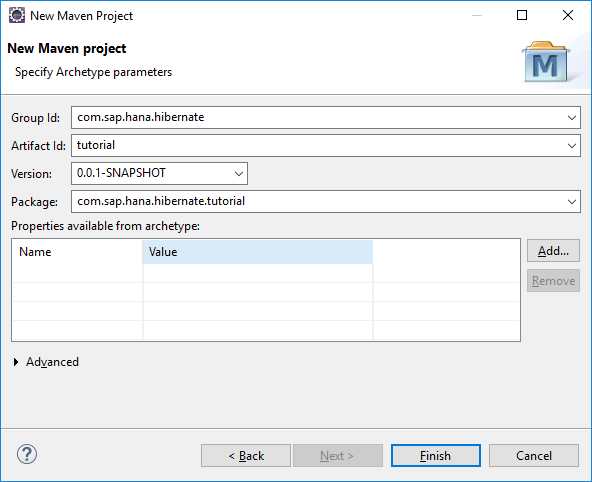
Then click on Finish.
Your project is now created.
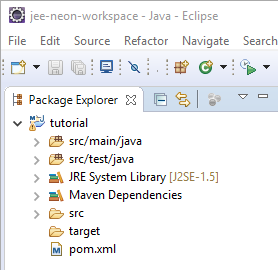
By default, the Eclipse Maven plugin will configure the project to use Java 1.5. Since this Java version is very old and lacks many features, we will set the Java version to Java 8.
Open the pom.xml file and switch to the Overview tab.
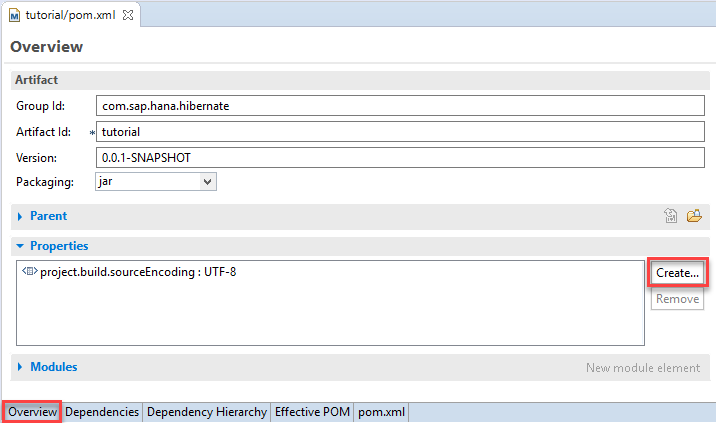
Click on Create… in the Properties area.
Enter the following details:
- Name:
maven.compiler.source - Value:
1.8

Click on OK
Save the pom.xml file.
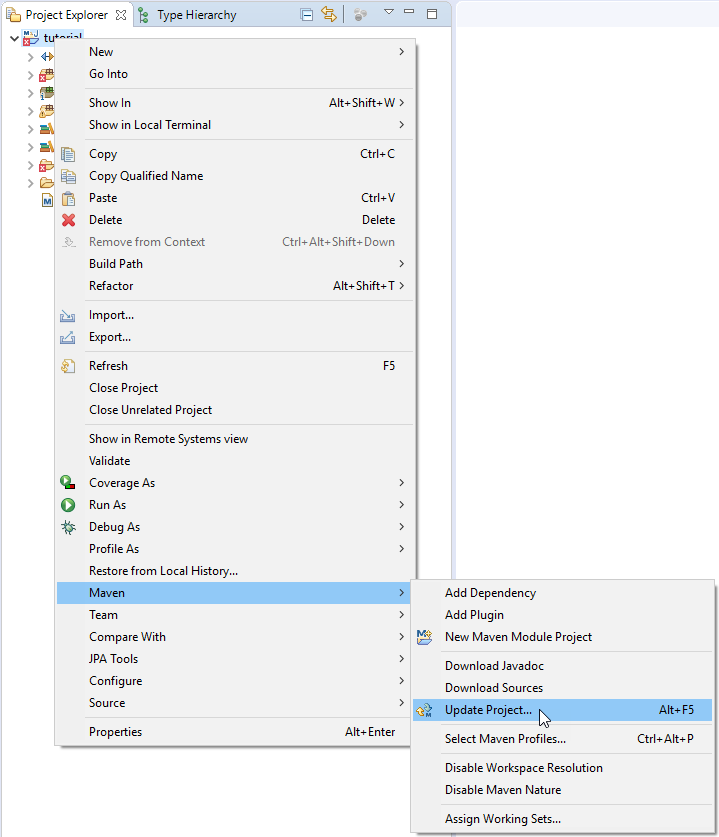
In order for the change to become effective, the project configuration must be updated.
Right-click on the project in the Project Explorer tab and choose Maven -> Update Project….
The following dialog shows what will be updated. You don’t need to change anything.
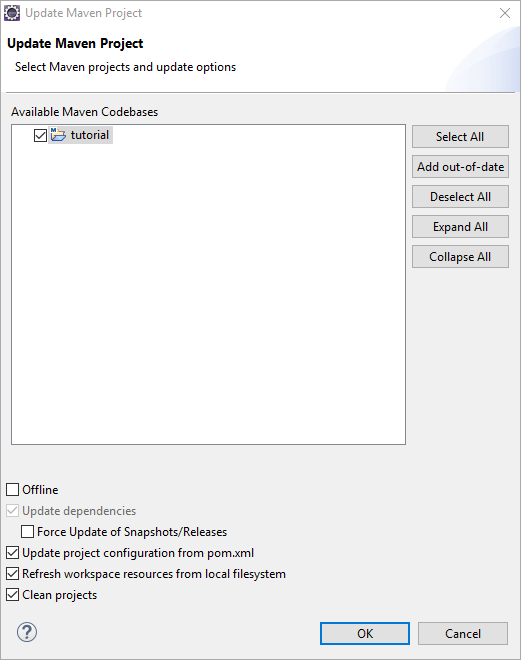
Click on OK
Open the pom.xml file and switch to the Dependencies tab.

Click on Add in the Dependencies area (not the Dependency Management).
Enter the following details:
- Group Id:
org.hibernate - Artifact Id:
hibernate-core - Version:
5.3.6.Final

Click on OK
Save the pom.xml file.
The project should rebuild automatically.
If you are using Java 9 or higher, you’ll have to add the JAXB jars as explicit dependencies. Add the following dependencies just like the Hibernate dependency in the previous step:
JAXB API
- Group Id:
javax.xml.bind - Artifact Id:
jaxb-api - Version:
2.2.11
JAXB Core
- Group Id:
com.sun.xml.bind - Artifact Id:
jaxb-core - Version:
2.2.11
JAXB Implementation
- Group Id:
com.sun.xml.bind - Artifact Id:
jaxb-impl - Version:
2.2.11
Activation Framework
- Group Id:
javax.activation - Artifact Id:
activation - Version:
1.1.1
The HANA JDBC driver can be added as another Maven dependency. Repeat the steps to add a Maven dependency with the following data:
- Group Id:
com.sap.cloud.db.jdbc - Artifact Id:
ngdbc - Version:
2.3.48
Create a file named persistence.xml in tutorial/src/main/resources/META_INF using the File -> New -> File menu bar.

Paste the following content into the persistence.xml file:
<?xml version="1.0" encoding="UTF-8"?>
<persistence xmlns="http://java.sun.com/xml/ns/persistence" version="1.0">
    <persistence-unit name="Tutorial">
        <provider>org.hibernate.jpa.HibernatePersistenceProvider</provider>
        <properties>
            <property name="hibernate.dialect" value="org.hibernate.dialect.HANAColumnStoreDialect"/>
            <property name="hibernate.connection.driver_class" value="com.sap.db.jdbc.Driver"/>
            <!-- update the <server host> and <port>-->
            <property name="hibernate.connection.url" value="jdbc:sap://<server host>:<port>"/>
            <!-- update the <username>-->
            <property name="hibernate.connection.username" value="<username>"/>
            <!-- update the <password>-->
            <property name="hibernate.connection.password" value="<password>"/>
            <!-- -->
            <property name="hibernate.connection.pool_size" value="5"/>
            <property name="hibernate.show_sql" value="false"/>
            <property name="hibernate.format_sql" value="true"/>
            <property name="hibernate.hbm2ddl.auto" value="create-drop"/>
            <property name="hibernate.bytecode.provider" value="javassist" />
            <property name="hibernate.bytecode.use_reflection_optimizer" value="true" />
          	<property name="hibernate.jdbc.batch_size" value="10000" />
        </properties>
    </persistence-unit>
</persistence>
Don’t forget to update the following property values to match your target SAP HANA instance:
hibernate.connection.urlhibernate.connection.usernamehibernate.connection.password
Save the persistence.xml file.
Create a new TestSetup Java class in a package named com.sap.hana.hibernate.tutorial.setup (either using a right-click on the project and choose New -> Class or use the File -> New -> Class menu bar), then paste the following content:
package com.sap.hana.hibernate.tutorial.setup;

import javax.persistence.EntityManager;
import javax.persistence.EntityManagerFactory;
import javax.persistence.Persistence;
import javax.persistence.Query;

public class TestSetup {

	public static void main(String[] args) {
		try {
      EntityManagerFactory entityManagerFactory = Persistence.createEntityManagerFactory("Tutorial");
  		EntityManager entityManager = entityManagerFactory.createEntityManager();

      Query nativeQuery = entityManager.createNativeQuery("SELECT * FROM DUMMY");
			String result = String.valueOf(nativeQuery.getSingleResult());
			if ("X".equals(result)) {
				System.out.println("SUCCESS!");
			} else {
				throw new RuntimeException("Wrong result!");
			}
			entityManager.clear();
			entityManager.close();
		} catch (Exception e) {
			e.printStackTrace();
		}
		System.exit(0);
	}
}Save the class file.
Run the application by right-clicking the class file and choosing Run As -> Java Application or click on the
You should see the following output log in your console:
Hibernate:
    SELECT
        *
    FROM
        DUMMY
SUCCESS!
Provide an answer to the question below then click on Validate.
Resources
Discussion
Share feedback on this tutorial or join the conversation in SAP Community.