
Overview
You will learn
- An overview of Custom Adapters for SAP HANA Streaming Lite
- The steps in order to create and deploy a Custom Java Adapter


Prerequisites
Prerequisites
- Proficiency: Beginner
- Tutorial: Streaming Analytics: Freezer Monitoring Tutorial
- Tutorial: Freezer Monitoring Lite Tutorial for Streaming Lite
- SAP HANA 2.0 system with minimum version SP02
- Streaming Analytics server running on SAP HANA
- HANA Studio development environment,
PuTTY, andWinSCP Raspberry Pi 2microcontroller board setup runningRaspbianwith network connection forSSH- Setup
Raspberry Piuser as"Pi", and root directory as"/home/pi"
Steps
The Custom Java Adapter will be executed on a remote device, and will send data into a Streaming Lite project running on that same device. It is up to the Custom Java Adapter to poll any available hardware sensors for values.
The Custom Java Adapter will be created using the Java SDK, and can be built from the SAP HANA Studio eclipse environment. We will deploy the package onto the Raspberry Pi (the remote device used for this tutorial) to stream data into the Freezer Monitoring Lite project. The purpose of this tutorial is to show how to create your own Custom Java Adapter tool given a specific schema.
The Java Adapter fits into a larger architecture. After sending data into Streaming Lite, a Streaming Web Service output adapter carries the manipulated data into a Streaming Analytics project via the Streaming Web Service. For this tutorial, we will only be focusing on the Custom Java Adapter.

The remote device we will be using is a Raspberry Pi, running on Raspbian 7.8. However, any device which runs Streaming Lite will work for this walk-through. On the Raspberry Pi, the home directory is /home/pi, and the $STREAMING_HOME variable is our Streaming Lite installation folder, /home/pi/install.
First, we will obtain the necessary Java SDK files from our Smart Data Streaming installation on our SAP HANA system. We will then develop a Java class called "JavaAdapter", inside Eclipse/HANA Studio on our personal computer. Finally, we will export the source file into a .jar, and deploy the project onto the Raspberry Pi to be run.
The project we are creating this Java Adapter for is called freezer_monitoring_lite, and has been created in previous tutorial Streaming Lite: Freezer Monitoring Lite. The specific stream we are connecting to is called isFreezerTemperatureReading. Here is the CCL for the stream:
CREATE INPUT STREAM isFreezerTemperatureReading SCHEMA (
  SensorId string ,
  Temperature float ,
  ReadingDate msdate ,
  Id long ) AUTOGENERATE ( Id ) ;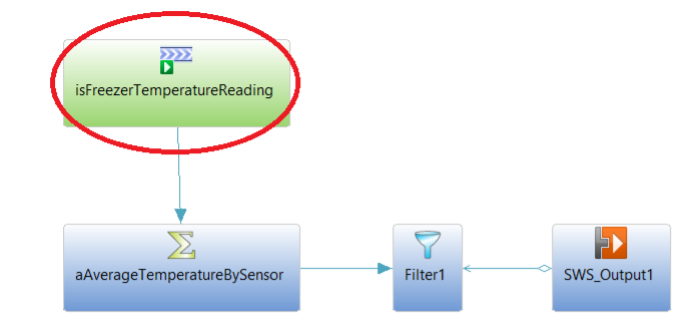
For the question below, select the correct answer, and click Validate.
Resources
Discussion
Share feedback on this tutorial or join the conversation in SAP Community.