
Integrate Your Application with SAP Build Work Zone, Standard Edition
This tutorial shows you how to subscribe to the SAP Build Work Zone, standard edition.
Overview
You will learn
- How to subscribe to SAP Build Work Zone, standard edition.
- How to assign the SAP Build Work Zone, standard edition role collection to your user.
- How to integrate your application with SAP Build Work Zone, standard edition.


Prerequisites
Prerequisites
- You’ve created a role collection and assigned it to a user. Follow the steps in the Assign the User Roles tutorial that is part of the Deploy a Full-Stack CAP Application in SAP BTP, Cloud Foundry Runtime Following SAP BTP Developer’s Guide tutorial group.
- You have an enterprise global account in SAP BTP. To use services for free, you can sign up for an SAP BTPEA (SAP BTP Enterprise Agreement) or a Pay-As-You-Go for SAP BTP global account and use the free tier services only. See Using Free Service Plans.
- You have a platform user. See User and Member Management.
- You’re an administrator of the global account in SAP BTP.
- You have a subaccount in SAP BTP to deploy the services and applications.
- You have a tenant of SAP Cloud Identity Services. See Get Your Tenant for details how to get a tenant of SAP Cloud Identity Services if you don’t have one yet.
- You’ve established trust between your tenant of SAP Cloud Identity Services and your SAP BTP account. This established trust allows you to use your SAP Cloud Identity Services tenant as an identity provider or a proxy to your own identity provider hosting your business users. See Establish Trust and Federation Between SAP Authorization and Trust Management Service and SAP Cloud Identity Services.
- You have one of the following browsers that are supported for working in SAP Business Application Studio:
- Mozilla Firefox
- Google Chrome
- Microsoft Edge
OUT OF MAINTENANCE
This tutorial is no longer maintained. For an up-to-date version and support with any issues, refer to the Develop a Full-Stack CAP Application Following the SAP BTP Developer’s Guide mission in the SAP Discovery Center.
Steps
Navigate to your subaccount and choose Services → Service Marketplace on the left.
Search for the SAP Build Work Zone, standard edition tile and choose Create.

Create SAP Build Work Zone, standard edition Keep the default setting for Service and choose free for Plan.
Choose Create.
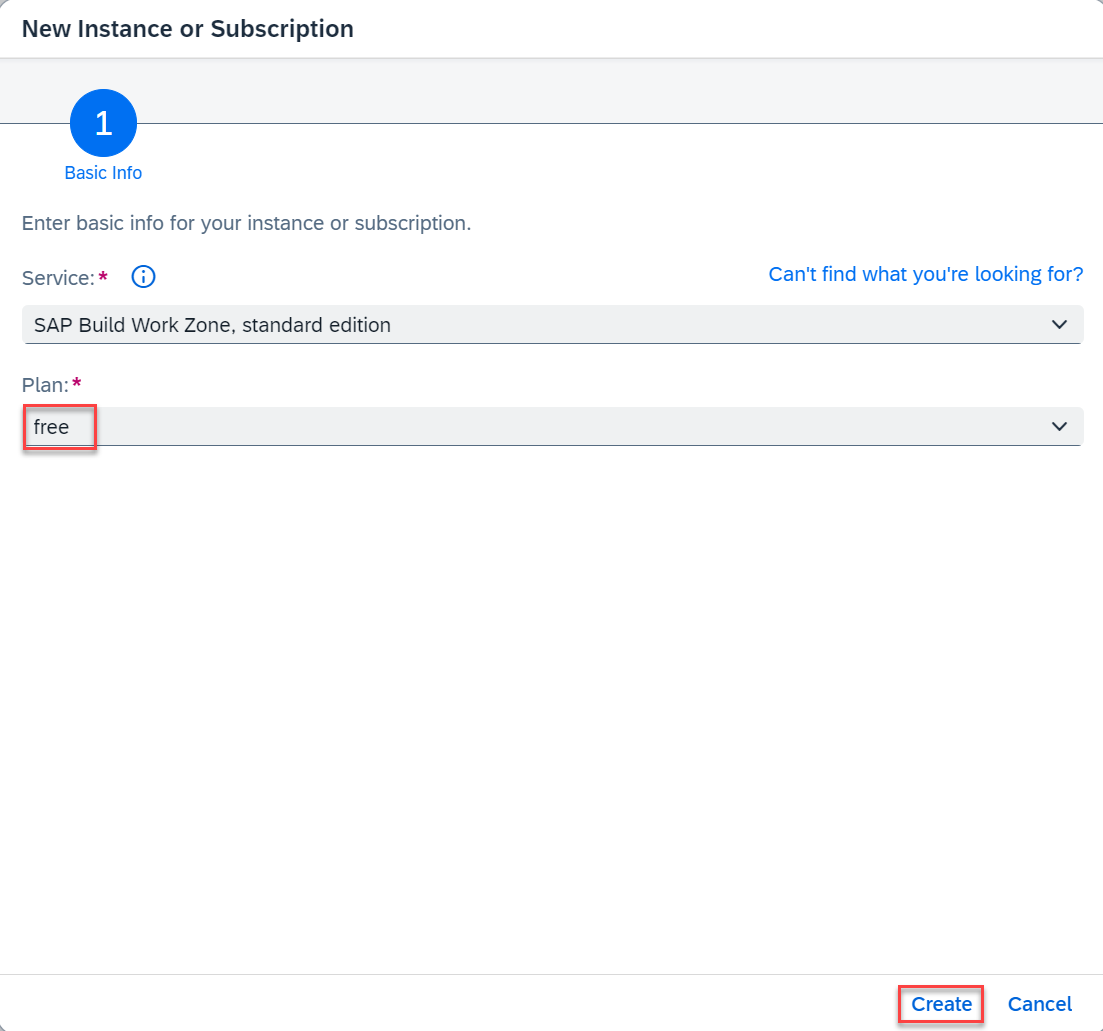
New Instance or Subscription
You have now subscribed to the SAP Build Work Zone, standard edition.
You need to assign your user to the Launchpad_Admin role collection, so you don’t get an error accessing the SAP Build Work Zone, standard edition site later on.
Choose Security → Users on the left.
Choose your user.
Under Role Collections on the right, choose Assign Role Collection and assign the Launchpad_Admin role collection to your user.

Add role You’ve assigned the Launchpad_Admin role collection to your user.
Log out and log back in to make sure your new role collection is considered.
See section Initial Setup in the SAP Build Work Zone, standard edition’s documentation for more details.
There are two different ways to integrate your application with SAP Build Work Zone, standard edition. You have to choose one way or the other and follow through. It’s currently not possible to mix the approaches. Both ways provide the same result. You can integrate your application with SAP Build Work Zone, standard edition through the SAP BTP cockpit or through Common Data Model. The tabs SAP BTP cockpit and Common Data Model provide detailed steps for each alternative way.
Update content
Open your subaccount and navigate to Instances and Subscriptions.
Choose the application SAP Build Work Zone, standard edition.

WorkZone0 In the menu on the left side, choose the icon for Channel Manager.
Fetch the updated content.

WorkZone1
Add application to Content Explorer
Choose Content Manager in the menu on the left and choose Content Explorer.

WorkZone2 Select the tile HTML5 Apps with your respective subdomain name.

WorkZone2 In the items table, select the checkbox for incident-management app and choose Add.

WorkZone3
Create a group
Go back to the Content Manager and choose Create → Group.

WorkZone4 In the Group title field, enter Incident Management Group.
Assign the Incident-Management app to the group.
Choose Save.

WorkZone5
Add application to the Everyone role
Back in the Content Manager, choose the Everyone role and choose Edit.
In the Assignment Status, assign the Incident-Management app to the role.
Choose Save.

WorkZone6
Create site
Navigate to Site Directory and choose Create Site.

WorkZone7 In the Site Name field, enter Incident Management Site and choose Create.

WorkZone7 Now, you’re forwarded to your created site.
The Common Data Model (CDM) is the basis for interoperability and content federation of business content from various SAP and third-party products, all integrated in a unified manner in one site that serves as a central entry point. Business content items such as roles, catalogs, groups, spaces, and pages can be included in the CDM. For this purpose, developers must specify the business content of the site in a cdm.json file that is part of the multitarget application (MTA) and also define design-time and runtime destinations in the mta.yaml file. For more information, see Developing HTML5 Business Solutions as Content Providers and About the Common Data Model.
Create the CDM configuration
Create a new folder workzone in the root of your project.
Create file cdm.json in the workzone folder and paste the following code snippet in the file:
JSON[ { "_version": "3.0", "identification": { "id": "defaultCatalogId", "title": "{{title}}", "entityType": "catalog" }, "payload": { "viz": [ { "appId": "ns.incidents", "vizId": "incidents-display" } ] }, "texts": [ { "locale": "", "textDictionary": { "title": "Default Catalog Title" } } ] }, { "_version": "3.0", "identification": { "id": "defaultGroupId", "title": "{{title}}", "entityType": "group" }, "payload": { "viz": [ { "appId": "ns.incidents", "vizId": "incidents-display" } ] }, "texts": [ { "locale": "", "textDictionary": { "title": "Business Apps" } } ] }, { "_version": "3.0", "identification": { "id": "defaultRole", "entityType": "role", "title": "Default Role" }, "payload": { "apps": [ { "id": "ns.incidents" } ], "catalogs": [ { "id": "defaultCatalogId" } ], "groups": [ { "id": "defaultGroupId" } ] } } ]
Update the mta.yaml file
Add
html5-repo-runtimeunder resources:yaml[3-7]resources: ... - name: incident-management-html5-repo-runtime type: org.cloudfoundry.managed-service parameters: service: html5-apps-repo service-plan: app-runtimeUpdate the
incident-management-destinationsmodule:Add the
incidents-html-repo-runtimeto therequiressection:yaml[4-7]- name: incident-management-destinations type: com.sap.application.content requires: - name: incident-management-html5-repo-runtime parameters: service-key: name: incident-management-html5-repo-runtime-service-keyAdd the following code snippet for subaccount destinations in the
parameters.contentsection:yaml[7-12]- name: incident-management-destinations type: com.sap.application.content requires: ... parameters: content: subaccount: destinations: - Name: incident-management-cdm ServiceInstanceName: incident-management-html5-repo-runtime ServiceKeyName: incident-management-html5-repo-runtime-service-key URL: https://html5-apps-repo-rt.${default-domain}/applications/cdm/<cloud-service-name> instance: existing_destinations_policy: update destinations: ...
You can find the value for
<cloud-service-name>in the app/incidents/webapp/manifest.json file.json[3]"sap.cloud": { "public": true, "service": "incidentmanagement.service" }Update the
incident-management-destinationresource:Add the following code snippet for destinations to the
parameters.config.init_datasection:[8-15]- name: incident-management-destination type: org.cloudfoundry.managed-service parameters: ... config: ... init_data: subaccount: destinations: - Name: incident-management-rt Authentication: NoAuthentication ProxyType: Internet Type: HTTP URL: https://<subdomain>.launchpad.${default-domain} CEP.HTML5contentprovider: true instance: existing_destinations_policy: update destinations: ...Replace
<subdomain>with your SAP BTP account’s subdomain. You can find the subdomain in the Overview page in SAP BTP cockpit.
Create a new module
incident-management-workzone-cdmto add the CDM Configuration from the cdm.json file as part of theincident-management-app-deployer.YAML- name: incident-management-workzone-cdm type: html5 path: workzone build-parameters: build-result: . supported-platforms: []Update the
incident-management-app-deployermodule:Update (
path,build-result, andtarget-pathparameters) of theincident-management-app-deployermodule as follows:YAML- name: incident-management-app-deployer type: com.sap.application.content path: gen ... build-parameters: build-result: app/ requires: - name: incidentmanagementincidents artifacts: - incidents.zip target-path: app/Add the following lines to the
requiressection:yaml[5-6]- name: incident-management-app-deployer type: com.sap.application.content path: gen requires: - name: incident-management-auth - name: incident-management-destinationAdd the following to the
build-parameters.requiressection:YAML- name: incident-management-workzone-cdm artifacts: - cdm.json target-path: app/
Verify. Here’s how your mta.yaml file looks like at this stage:
YAML_schema-version: 3.3.0 ID: incident-management version: 1.0.0 description: "A simple CAP project." parameters: enable-parallel-deployments: true deploy_mode: html5-repo build-parameters: before-all: - builder: custom commands: - npm ci - npx cds build --production modules: - name: incident-management-srv type: nodejs path: gen/srv parameters: buildpack: nodejs_buildpack readiness-health-check-type: http readiness-health-check-http-endpoint: /health build-parameters: builder: npm provides: - name: srv-api # required by consumers of CAP services (e.g. approuter) properties: srv-url: ${default-url} requires: - name: incident-management-db - name: incident-management-auth - name: incident-management-destination - name: incident-management-db-deployer type: hdb path: gen/db parameters: buildpack: nodejs_buildpack requires: - name: incident-management-db - name: incident-management-app-deployer type: com.sap.application.content path: gen requires: - name: incident-management-auth - name: incident-management-destination - name: incident-management-html5-repo-host parameters: content-target: true build-parameters: build-result: app/ requires: - name: incident-management-workzone-cdm artifacts: - cdm.json target-path: app/ - name: incidentmanagementincidents artifacts: - incidents.zip target-path: app/ - name: incident-management-app-deployer type: com.sap.application.content path: gen parameters: config: destinations: - forwardAuthToken: true name: incident-management-srv-api url: ~{srv-api/srv-url} - name: ui5 url: https://ui5.sap.com requires: - name: srv-api - name: incident-management-auth - name: incident-management-html5-repo-host parameters: content-target: true build-parameters: build-result: app/ requires: - name: incident-management-workzone-cdm artifacts: - cdm.json target-path: app/ - name: incidentmanagementincidents artifacts: - incidents.zip target-path: app/ - name: incidentmanagementincidents type: html5 path: app/incidents build-parameters: build-result: dist builder: custom commands: - npm ci - npm run build supported-platforms: [] - name: incident-management-destinations type: com.sap.application.content requires: - name: incidents_html_repo_runtime parameters: service-key: name: incidents-html5-app-runtime-service-key - name: incident-management-auth parameters: service-key: name: incident-management-auth-key - name: incident-management-html5-repo-host parameters: service-key: name: incident-management-html5-repo-host-key - name: srv-api - name: incident-management-destination parameters: content-target: true build-parameters: no-source: true parameters: content: subaccount: existing_destinations_policy: update destinations: - Name: incident-management_cdm ServiceInstanceName: incidents-html5-app-runtime-service ServiceKeyName: incidents-html5-app-runtime-service-key URL: https://html5-apps-repo-rt.${default-domain}/applications/cdm/<cloud-service-name> resources: - name: incident-management-db type: com.sap.xs.hdi-container parameters: service: hana service-plan: hdi-shared - name: incident-management-html5-repo-host type: org.cloudfoundry.managed-service parameters: service: html5-apps-repo service-plan: app-host - name: incident-management-auth type: org.cloudfoundry.managed-service parameters: service: xsuaa service-plan: application path: ./xs-security.json config: xsappname: incident-management-${org}-${space} tenant-mode: dedicated - name: incidents_html_repo_runtime type: org.cloudfoundry.managed-service parameters: service: html5-apps-repo service-name: incidents-html5-app-runtime-service service-plan: app-runtime - name: incident-management-destination type: org.cloudfoundry.managed-service parameters: service: destination service-plan: lite config: init_data: subaccount: existing_destinations_policy: update destinations: - Authentication: NoAuthentication Name: incident-management-rt ProxyType: Internet Type: HTTP URL: https://<subdomain>.launchpad.${default-domain} CEP.HTML5contentprovider: true
Deploy your application in SAP BTP, Cloud Foundry runtime
Open a terminal in your project’s root folder and run the following commands:
Shellmbt build cf deploy mta_archives/incident-management_1.0.0.mtar
Create a new content provider
Open your subaccount and navigate to Instances and Subscriptions.
Choose the application SAP Build Work Zone, standard edition.
WorkZone0 In the menu on the left side, choose the icon for Channel Manager.
Choose New → Content Provider on the right.

New Content Provider In the New Content Provider dialog:
In the Title field еnter CDM.
In the Design-Time Destination field, choose incident-management-cdm from the dropdown.
In the Runtime Destination field, choose incident-management-rt from the dropdown.
Choose Save.

New Content Provider dialog Fetch the updated content from the CDM content provider.

New Content Provider fetch
Create site
Navigate to Site Directory and choose Create Site.
WorkZone7 In the Site Name field, enter Incident Management Site and choose Create.
WorkZone7 When you’re forwarded to your created site, choose Role Assignments and then choose Edit.

WorkZone7 In the Assignment status field, switch on Default Role for your site and choose Save.
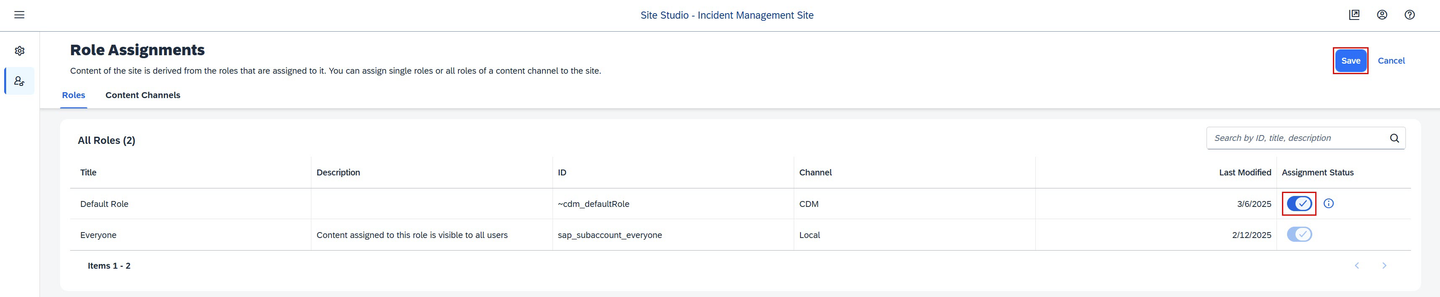
WorkZone7
Assign CDM role collection
You need to assign your user to the ~cdm_defaultRole role collection, so you’re able to see the application tile when accessing the SAP Build Work Zone, standard edition site later on.
Open your subaccount and navigate to Security → Users.
Choose your user.
Under Role Collections on the right, choose Assign Role Collection and assign the ~cdm_defaultRole role collection to your user.

Add CDM role You’ve assigned the ~cdm_defaultRole role collection to your user.
Log out and log in again to make sure your new role collection is considered.
Navigate to Site Directory and find your site.

WorkZone8 Choose Go to the site.

WorkZone9 Choose the Incident Management application from the launch page.
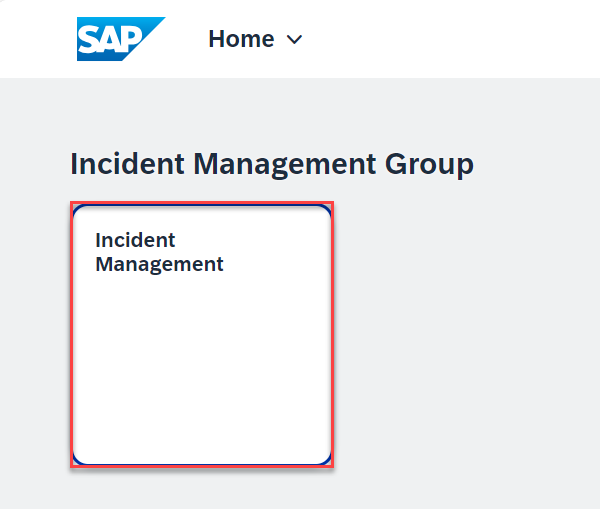
WorkZone10 You see the list report page.
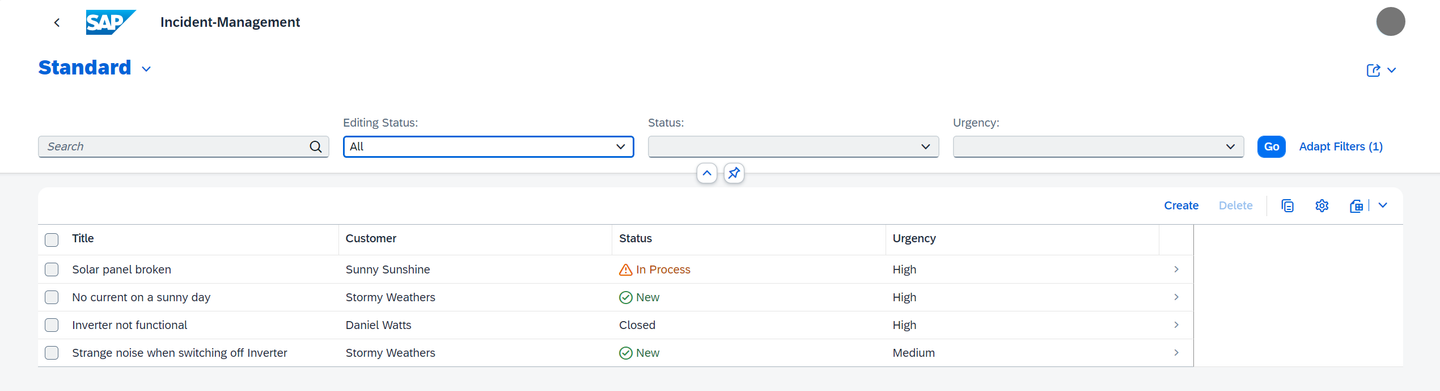
WorkZone11
Congratulations! You now have finished the development of your application and you’ve integrated SAP Build Work Zone, standard edition to have one central entry point to show all of your SAP BTP applications.
Resources
Discussion
Share feedback on this tutorial or join the conversation in SAP Community.