
Overview


Prerequisites
Prerequisites
- This tutorial is designed for SAP HANA on premise and SAP HANA, express edition. It is not designed for SAP HANA Cloud.
- Proficiency: Intermediate
- Tutorials: SAP HANA XS Advanced - Modules within Node.js SAP HANA applications
Steps
In the previous tutorial, you added a handler for a path called /node by modifying the files myNode.js.
Add a new route for example1 in myNode.js to get the database connection/client from the express request object (req.db). Then create a prepared statement for the SELECT of SESSION_USER from dummy (dummy is the synonym created in the initial HDI tutorial). Execute the statement and send the results as JSON in the response object.
//Simple Database Select - In-line Callbacks
//Example1 handler
app.get("/example1", (req, res) => {
	let client = req.db;
	client.prepare(
		`SELECT SESSION_USER, CURRENT_SCHEMA
									 FROM "DUMMY"`,
		(err, statement) => {
			if (err) {
				return res.type("text/plain").status(500).send(`ERROR: ${err.toString()}`);
			}
			statement.exec([],
				(err, results) => {
					if (err) {
						return res.type("text/plain").status(500).send(`ERROR: ${err.toString()}`);
					} else {
						var result = JSON.stringify({
							Objects: results
						});
						return res.type("application/json").status(200).send(result);
					}
				});
			return null;
		});
	return null;
});As follows:
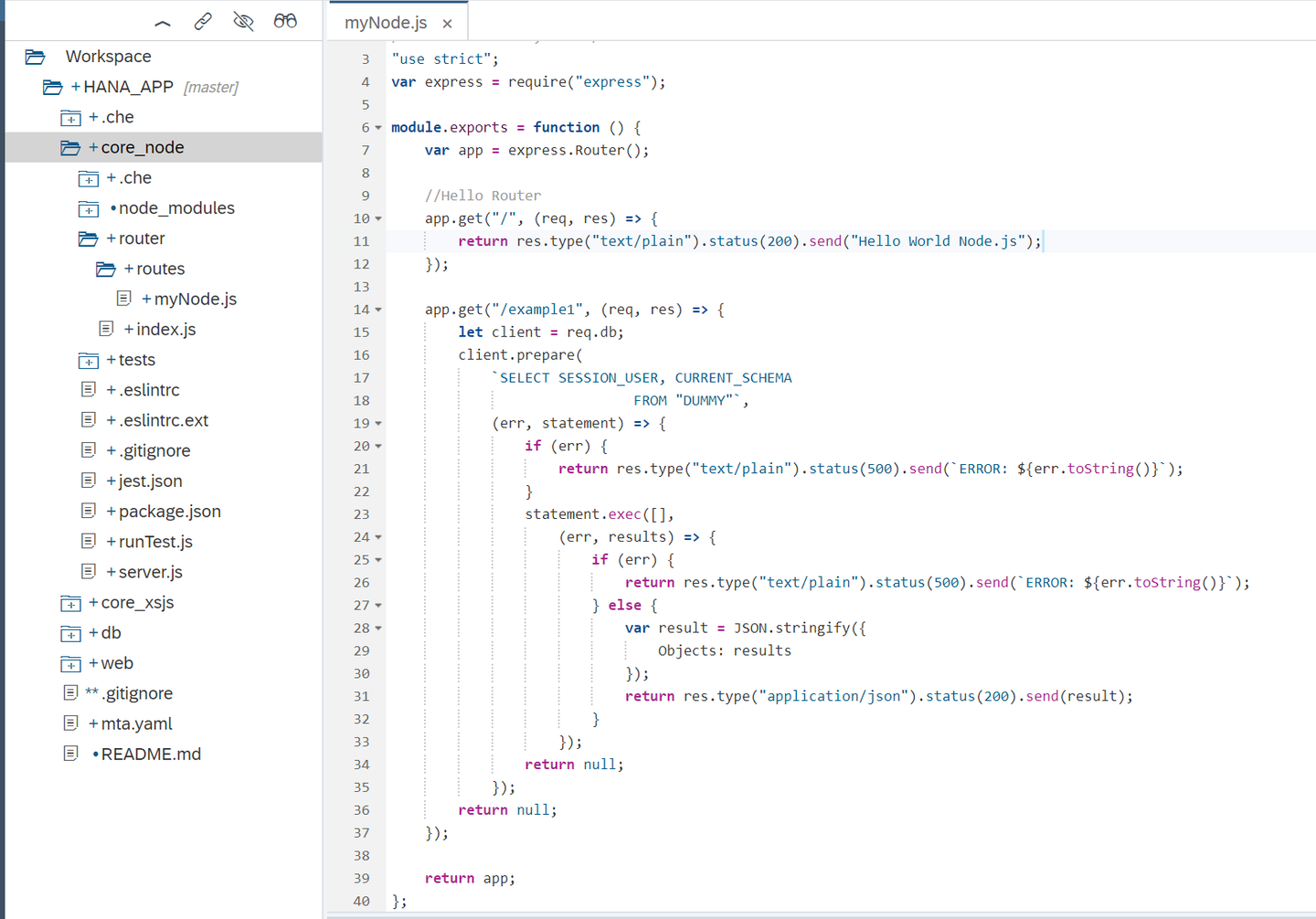
Run the node and web modules. You should see that the build and deploy are successful. Call the example1 script by changing the web tab
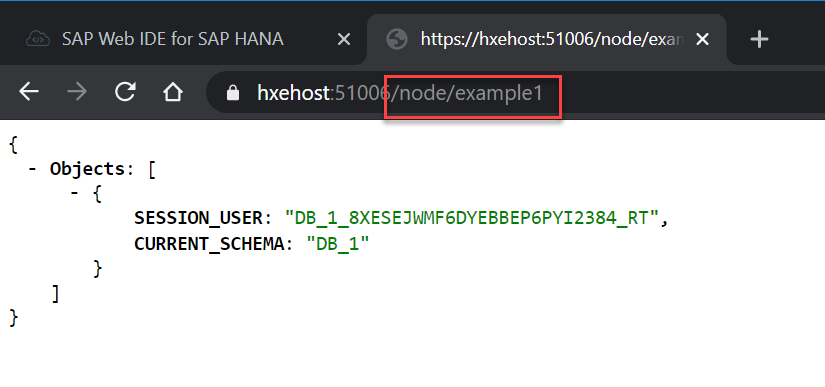
You can see the SESSION_USER returned by the SELECT statement.
The default programming approach in Node.js is using callbacks/event handlers. This is because even the different parts of a database request (connection, prepared statement, execution, etc) are all non-blocking operations.
Hint: A callback is an asynchronous operation that gets executed after another one notifies completion.
Add a second route handler, called example2, that uses the async module:
var async = require("async");
//Simple Database Select Via Client Wrapper/Middelware - Async Waterfall
app.get("/example2", (req, res) => {
	let client = req.db;
	async.waterfall([
		function prepare(callback) {
			client.prepare(`SELECT SESSION_USER, CURRENT_SCHEMA
											FROM "DUMMY"`,
				(err, statement) => {
					callback(null, err, statement);
				});
		},

		function execute(err, statement, callback) {
			statement.exec([], (execErr, results) => {
				callback(null, execErr, results);
			});
		},
		function response(err, results, callback) {
			if (err) {
				res.type("text/plain").status(500).send(`ERROR: ${err.toString()}`);
			} else {
				var result = JSON.stringify({
					Objects: results
				});
				res.type("application/json").status(200).send(result);
			}
			return callback();
		}
	]);
});Take a look at both newly-added examples. You can easily notice that the second one is easier to read, although the runtime does not change. You can check for more information on the async module in the async documentation.
Resources
Discussion
Share feedback on this tutorial or join the conversation in SAP Community.